The Onboarding and Training Handbook
Management · Nº 65
The Onboarding and Training Handbook
An Employee's First 30 Days, from the First Shift to Working Solo
Your new hire quit by Friday. Nobody had time to teach them.
24 tools for an employee's first month, from the first shift script to the station sign-off test, with one burger chain worked through start to finish and a spreadsheet already filled in.
You get 24 tools to plan the arrival, run the first shift hour by hour, teach at the station, and follow up through day 30. Plus a 7-tab spreadsheet, the day 7, 15, and 30 check-in scripts, and a Template kit with 14 ready-made texts.
A book explains the method. This handbook puts it to work: the tool, a worked example, and a spreadsheet with your numbers.
One-time payment of $29.00. The order form shows the final amount, with any taxes for your country, before you pay.
Digital delivery: PDF handbook, spreadsheet and access on the Consylion platform.
14-day money-back guarantee: if it isn't what you expected, request a full refund within 14 days of purchase.
Your order is processed by Digistore24, our authorized reseller. By purchasing, you accept the terms of use and purchase · refund policy.
On Monday the new hire shows up and someone says: "stick with so-and-so and watch." So-and-so is in the middle of the rush and has no time to teach. By Friday, the new hire has gotten three orders wrong, been chewed out in front of a customer, and doesn't come back. You post the job again. The cost never shows up on a report. It hides in waste, in the hours someone spent teaching, in filling the job again, and in the next first day, which looks exactly like this one.
THE SPREADSHEET
30-day onboarding spreadsheet
Use the completed example as a reference and enter your business data in the marked fields. Check the instructions and the calculations before you make a decision.
SOUND FAMILIAR?
Three situations this handbook solves
Someone new starts on Tuesday
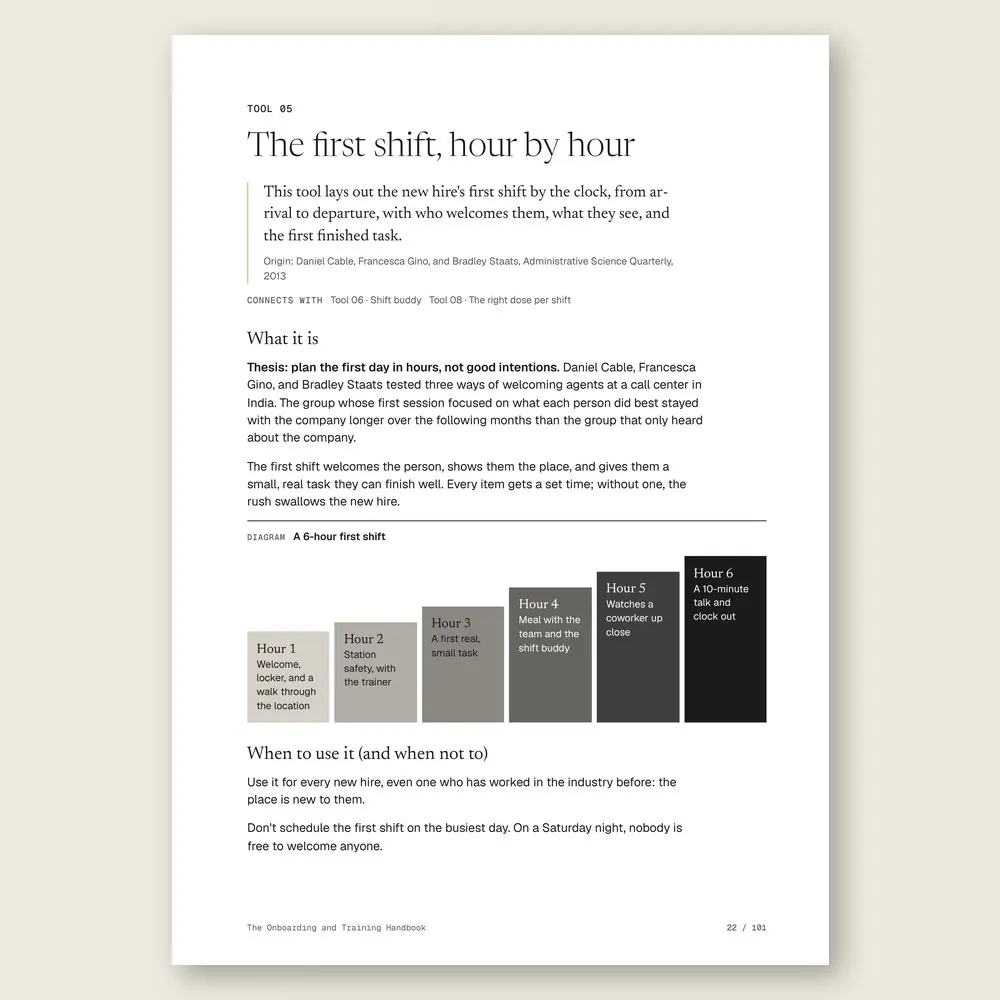
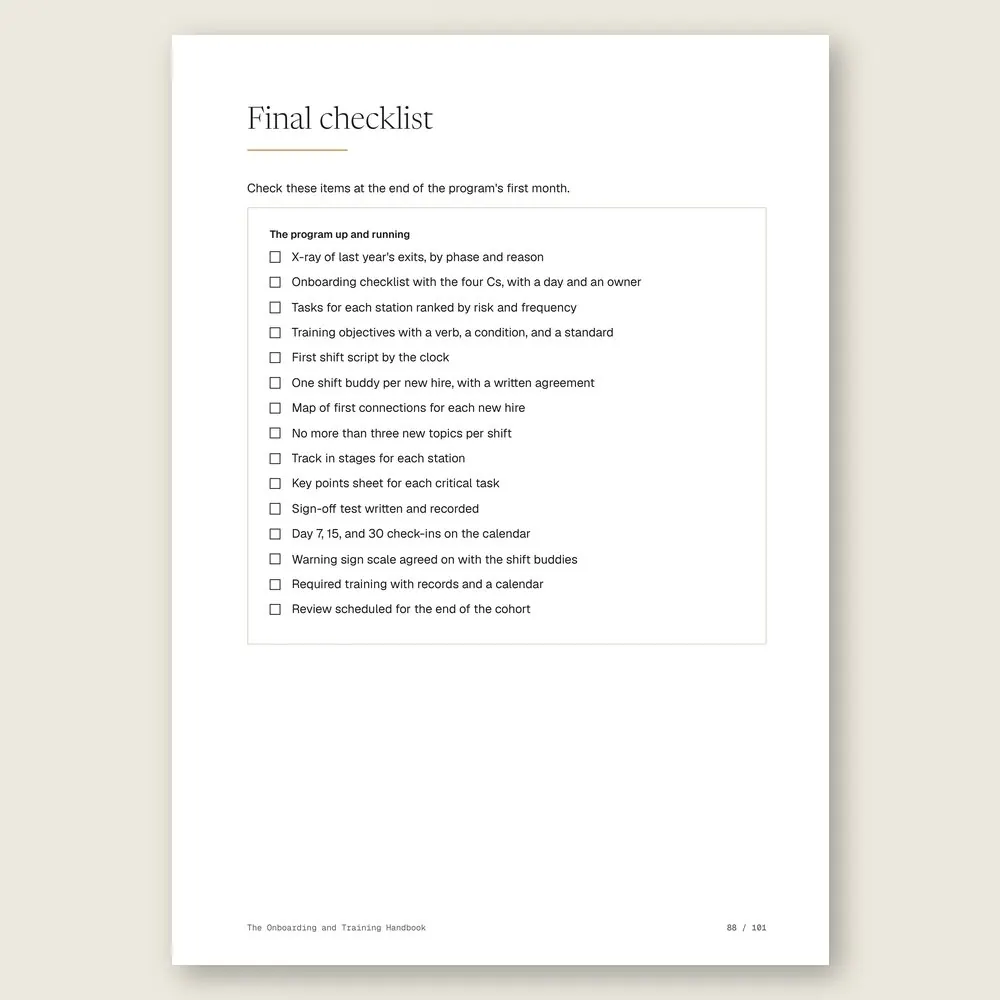
You print the first shift script: who meets them at the door, the safety walk, one real task they can finish, a meal with the team, and a 10-minute talk before they clock out. No more than three new topics, and a shift buddy already picked.
Your veteran can't explain what they do
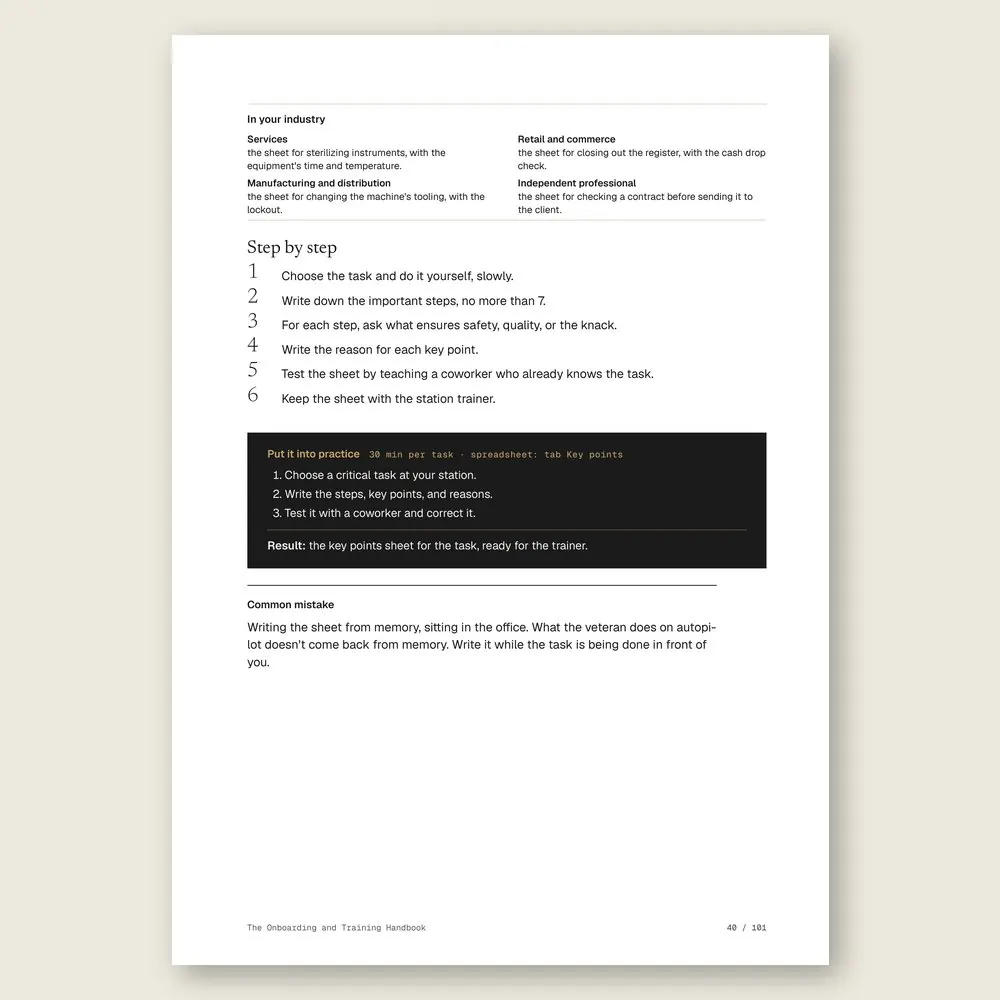
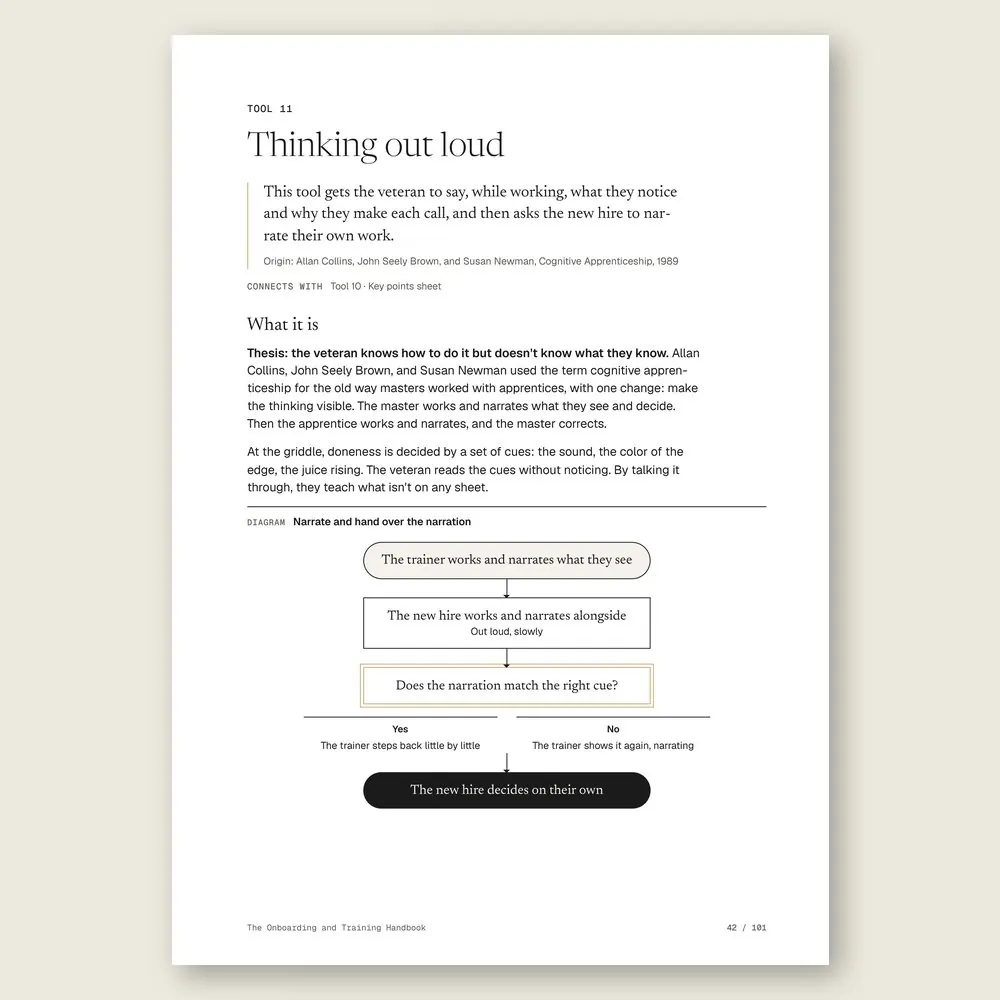
Years on the job, and the moves they make without thinking never make it into the explanation. You sit together, slow it down, and write one sheet: each step, the key point, and the reason. Then the veteran thinks out loud while working.
Day 15, and the new hire has gone quiet
A missed shift without notice. Eating alone on break. The warning signs tell you to talk today, not next week. You ask what's going on and mostly listen. Then you write it down for the cohort review.
INSIDE
What you'll find in each tool
Five parts that follow the new hire's first month. Plan before they arrive, starting with an X-ray of who left early and why. Run the first day and the first week. Teach at the station, one task and one key point at a time. Track the first 30 days with check-ins and a hands-on sign-off. Then keep the program going with trainers, refreshers, and a review after each cohort. Where local rules matter, it tells you what to check and with whom.
WHAT YOU GET
Everything included in your purchase
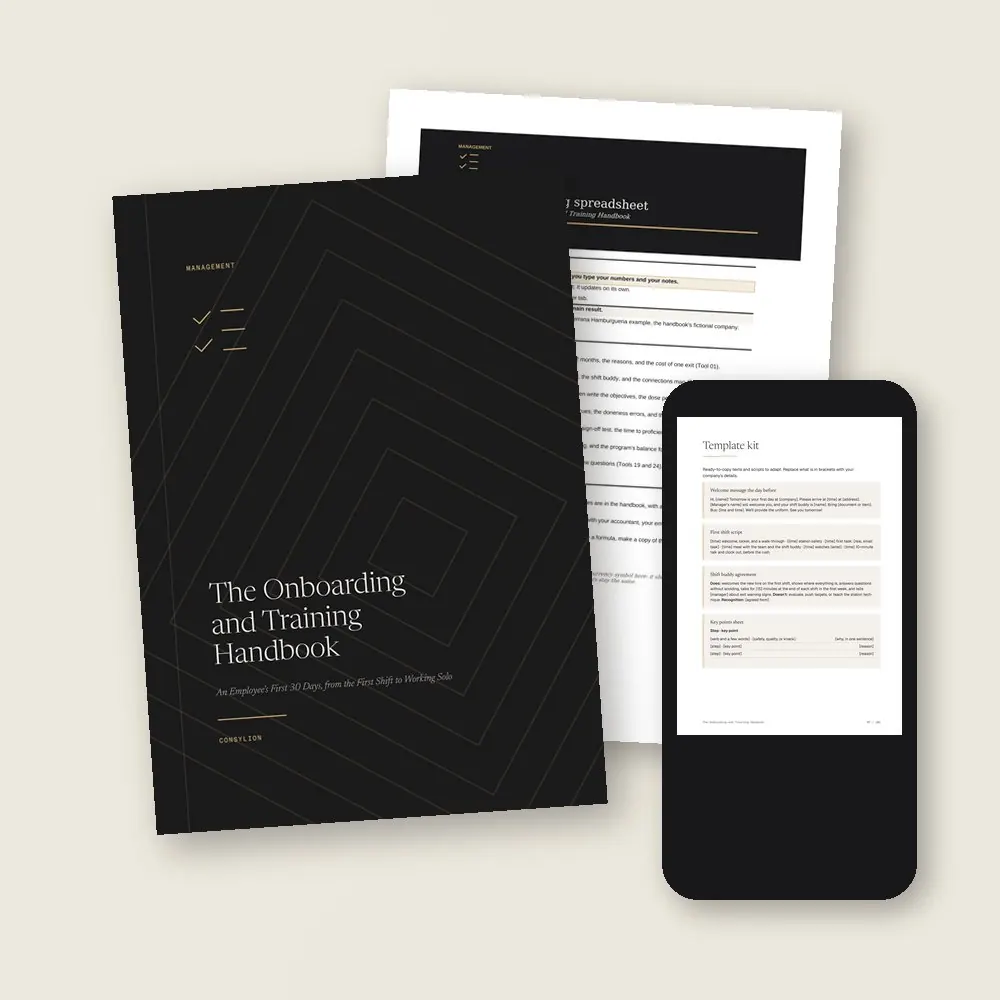
- The Onboarding and Training Handbook in PDF: 24 tools, each with a step by step, an example from the same company, and an exercise
- The 30-day onboarding spreadsheet in Excel and Google Sheets, with 7 working tabs, filled in with the example company
- The Template kit: 14 ready-made texts, from the welcome message the day before to the day 30 pulse check and the cohort review script
- 2 worksheets to fill in (first shift and station sign-off) and a 30-day plan, one week per stage
- Access to your handbook on the Consylion platform
Full table of contents
The 24 tools, in the order you'll use them
Part 1 · Part 1 · Plan before they arrive
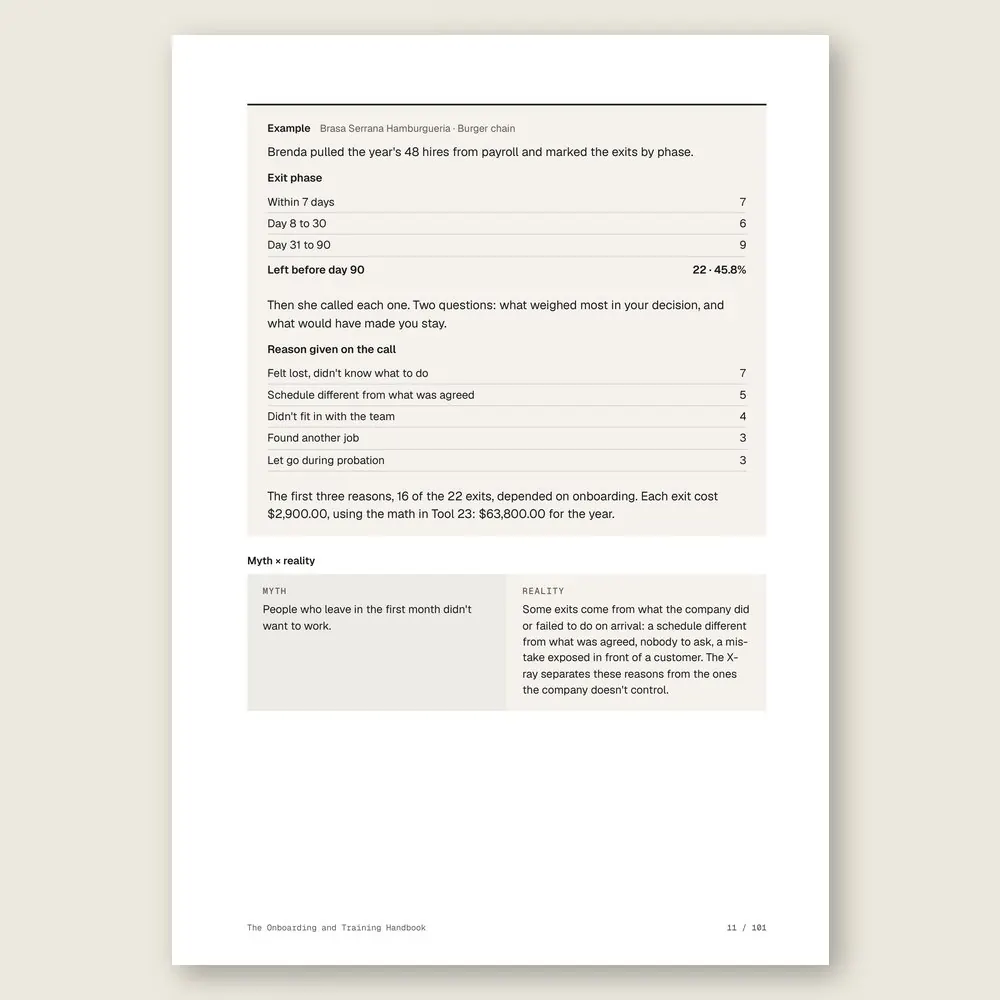
- 01An X-ray of early exitsSee who left before day 90, in which week, and the reason behind it
- 02The four Cs of onboardingCheck that onboarding covers rules, role, culture, and connections, not just paperwork
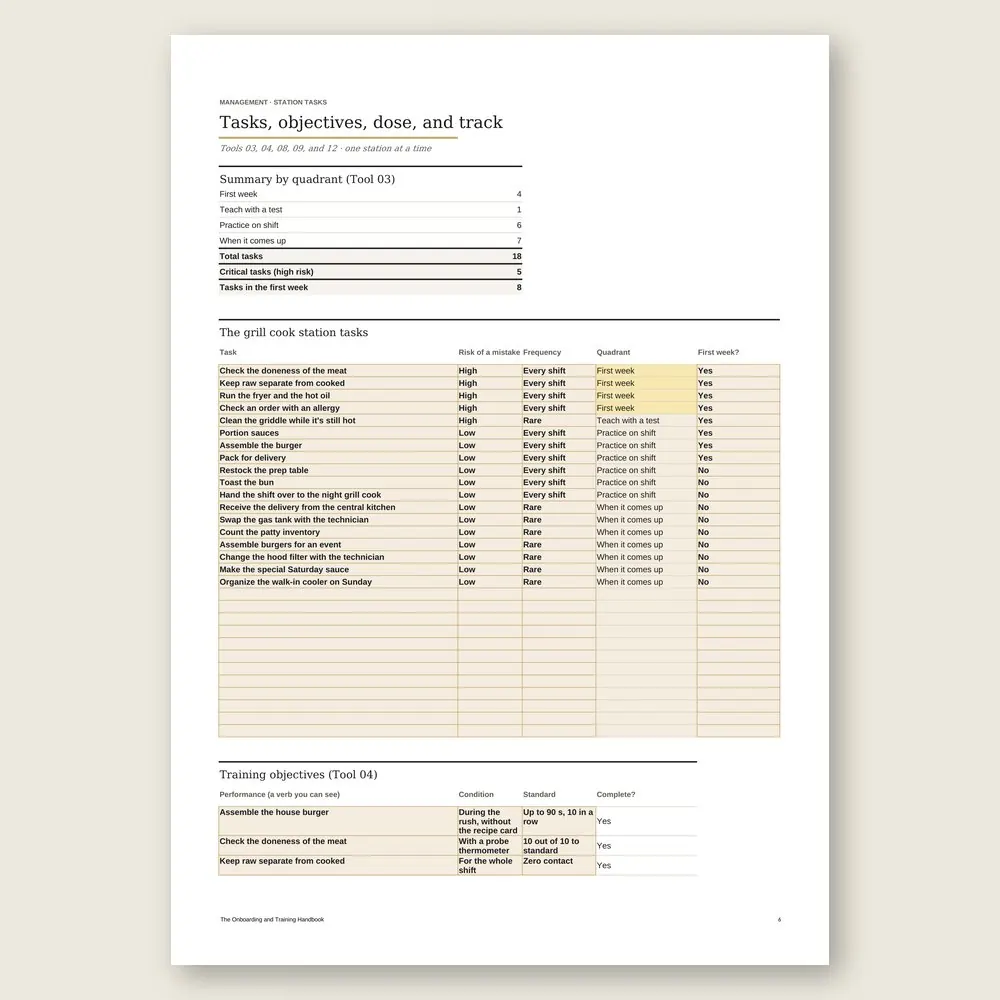
- 03Station tasks by riskDecide what they learn in week one and what can safely wait
- 04A training objective you can checkWrite what they'll be able to do, under what conditions, and to what standard
Part 2 · Part 2 · The first day and the first week
- 05The first shift, hour by hourA first-day script by the clock, from arrival to clock-out, with one finished task
- 06Shift buddyA coworker who welcomes them, answers the questions they won't ask the boss, and flags problems
- 07Map of first connectionsThe people they need to meet in the first month, why, and on which day
- 08The right dose per shiftNo more than three new topics per shift, so something actually sticks
Part 3 · Part 3 · Teach at the station
- 09From simple steps to the whole taskA training track in stages, from the quiet prep hours to the Saturday rush
- 10Key points sheetSteps, key points, and reasons for each critical task, on one sheet
- 11Thinking out loudYour veteran narrates what they notice and decide, so the new hire sees it too
- 12Memorize or look it upWhat goes in their head and what stays on the station poster
- 13Plant mistakes in trainingStage the rush mistakes in training, before a customer ever sees them
Part 4 · Part 4 · Track the first 30 days
- 14Three questions at the start of the shiftTwo minutes, three questions, at the start of each shift, to lock in what was taught
- 15The day 7, 15, and 30 check-insShort scripts to find out how the new hire is really doing
- 16Station sign-offA hands-on test on a real shift that shows when they can work solo
- 17Time to proficiencyCount the days until a new hire keeps up with the team, and spot who's stuck
- 18Early exit warning signsLateness, silence, and isolation: when to step in and what to say
Part 5 · Part 5 · Keep the training going
- 19New-hire pulse checkSix questions on day 30 about clarity, confidence, and welcome
- 20Train the trainerWhoever teaches learns how to teach, so training doesn't depend on you
- 2110-minute refresherA short weekly session that keeps standards fresh for the people already on the team
- 22Required training for your industryHygiene, safety, and record-keeping, with a calendar and who to check with
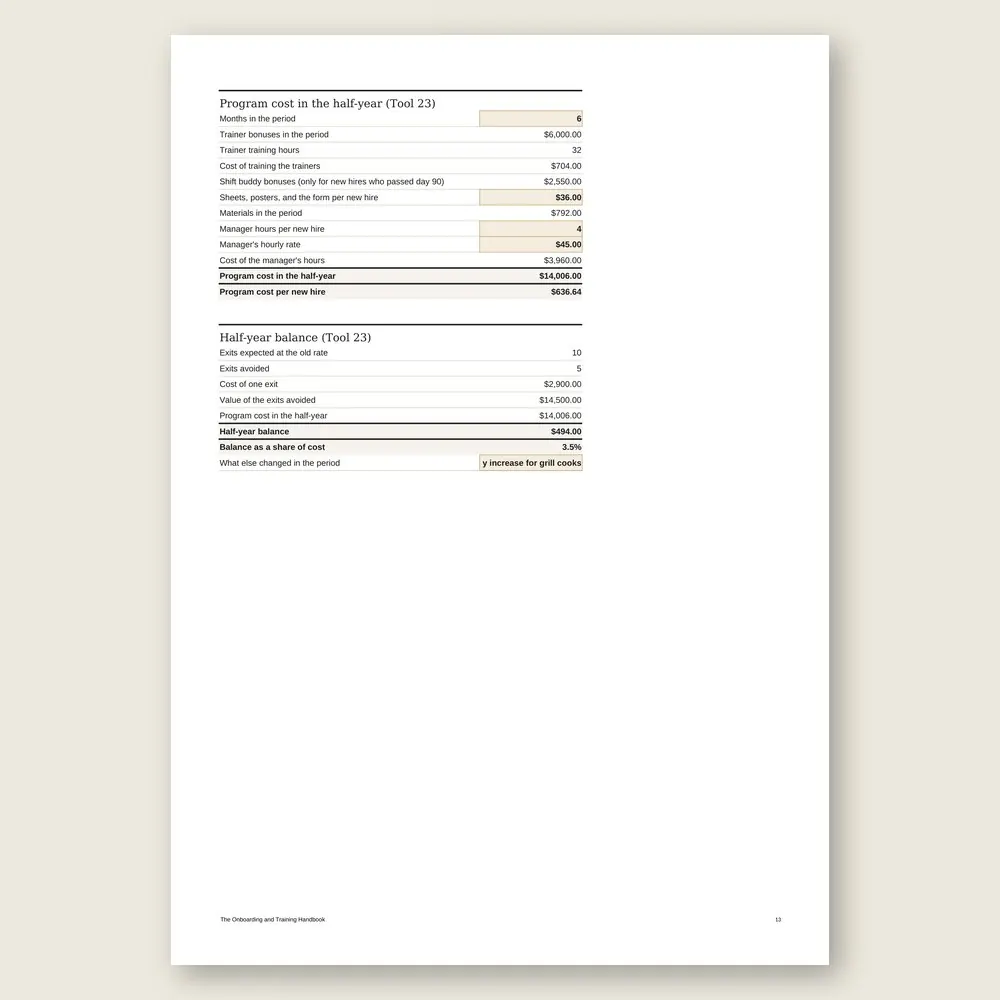
- 23What training costsPut the cost of the program next to the cost of people who leave
- 24Review each cohortFour questions after each cohort to fine-tune the next one
Who it's for
It's for you if
- You hire often and lose people before day 90, and you're not sure why
- You train on the fly, with the new hire trailing whoever happens to be on shift
- You run a frontline team: counter, kitchen, register, production, or customer service
- Your best people do the teaching, and nobody ever taught them how to teach
- You want training to keep running when the manager is on vacation
It's not for you if
- You need to write the job post, interview, and pick the candidate. That's The Hiring Handbook
- You want the whole HR cycle, from reviews to careers. See The People Management Handbook
- You want to write your company's standard procedures. That's The Process Handbook
- You're training salespeople. See The Sales Team Training Handbook
- You want a promise that nobody will quit. The handbook organizes the first month and measures what changed
Frequently asked questions
I only hire a few people a year. Is it worth it?
Yes, in a short version: the first shift script, a shift buddy, a key points sheet for your most critical task, and the day 7, 15, and 30 check-ins. With few hires, each one who leaves hurts more.
Will this work outside of restaurants?
The example is a burger chain, but every tool shows how it applies to services, retail and commerce, manufacturing and distribution, and independent professionals. Swap the griddle for your counter, your register, or your machine.
I don't have anyone to do the teaching. I do it all myself.
Start with the key points sheet for your most critical task. It saves you from repeating yourself, and it's the first step toward training a trainer when the team grows.
What about required training, like safety or food hygiene?
The rules differ by country and by industry. The handbook helps you build the list, the calendar, and the records, and flags what to confirm with your employment lawyer, accountant, workplace safety specialist, or health authority.
How much of the manager's time does it take?
In the example, about 10 minutes a day per new hire in the first month, or 4 hours per new hire in total. Once you've trained a few trainers, it goes down.
How long does it take to read?
About 2 hours and 24 minutes, or 6 minutes per tool, plus the exercises. The 30-day plan sets up the program in four weeks, ideally before your next hire.
What do I get, and in what formats?
Each handbook is a PDF of about 100 pages with 24 to 27 tools. Every tool has step-by-step instructions and a worked example. You also get the handbook's spreadsheet in Excel (.xlsx), which opens in Google Sheets too, with the example already filled in. The message, policy, and clause templates are in the Template Kit inside the PDF, ready to copy and adapt. Read it in the member area or download the files.
How do I know if it fits my business?
Each handbook's page shows the problem it solves, who it is for and who it is not for, the full table of contents, sample pages, and the company used in the examples. The examples come from small businesses in several industries, with illustrative numbers. If it is not a fit, you can ask for a full refund within 14 days of your purchase, as described in the Refund Policy.
What is the difference between a handbook, an area set, and the Series?
A handbook solves one problem. An area set brings together every handbook and spreadsheet in one of the 6 areas, for less than the price of 5 single handbooks. The Consylion Handbook Series brings together all 100 handbooks and 100 spreadsheets, for less than the price of 8 single handbooks, and includes the next handbooks in the Series. Products outside the Series, from Consylion Life or Consylion Business, have their own price. They are sold separately and are not part of an area set or the Series.
Do I need to read everything before I start?
No. Each tool works on its own. Open the table of contents, pick the tool for today's problem, and start there. You can also read it cover to cover.
Do I need to know Excel?
The basics are enough: open the file and fill in the marked fields. The formulas are already built, and the handbook's example is filled in for reference.
How do I pay, and when do I get access?
By card or bank transfer, as a one-time payment with no subscription. Once your payment is confirmed, you get access to the member area by email. Approved card payments are confirmed right away. Bank transfers are confirmed when the funds clear. If access does not arrive within 24 hours of confirmation, check your spam folder and write to team@consylion.org.
How long do I have access, and how can I use the files?
Access does not expire, and you can download the files for offline use. The license is individual. You may read the handbooks, print them for your own use, and fill in and adapt the spreadsheet and templates with your company's data. If you are a consultant, accountant, or manager, you may apply the tools with your clients and deliver the result of your work, not the files. You may not share, resell, or distribute the files or the access.
How do support and refunds work?
Support is by email at team@consylion.org, on business days, with a reply within 5 business days. It covers questions about access, files, and payment. It does not include consulting or advice on applying the material to your case. You can cancel within 14 days of your purchase, without giving a reason, and get the full amount back through the payment method you used. Send the request to the same email. The details are in the Refund Policy.

CONSYLION HANDBOOK SERIES
The 6 departments of your business, for less than the price of 8 single handbooks.
This handbook solves today's problem. The Series solves the next one, and the one after that, with nothing more to pay.
- 100 handbooks with 2,403 ready-made tools, to read on screen and download as PDFs
- 100 spreadsheets for Excel and Google Sheets
- 6 business areas
- Lifetime access, unlocked once payment is confirmed
One-time payment of $197.00. The order form shows the final amount, with any taxes for your country, before you pay.
Digital delivery: PDF handbook, spreadsheet and access on the Consylion platform.
14-day money-back guarantee: if it isn't what you expected, request a full refund within 14 days of purchase.
Your order is processed by Digistore24, our authorized reseller. By purchasing, you accept the terms of use and purchase · refund policy.
Management · Nº 65
Give your next hire a first month that's planned
Your next new hire will show up whether you have a plan or not. This handbook gives you the script, the sheets, the check-ins, and the spreadsheet to run their first 30 days on purpose. Whether they stay is still up to them. Whether they were taught is up to you.
See all 100 handbooks · $197.00
One-time payment of $29.00. The order form shows the final amount, with any taxes for your country, before you pay.
Digital delivery: PDF handbook, spreadsheet and access on the Consylion platform.
14-day money-back guarantee: if it isn't what you expected, request a full refund within 14 days of purchase.
Your order is processed by Digistore24, our authorized reseller. By purchasing, you accept the terms of use and purchase · refund policy.