The Paid Ads Handbook
Marketing · Nº 45
The Paid Ads Handbook
Meta Ads and Google Ads on a Small Budget
You boosted the post. You got the likes. How many customers did that money bring in?
24 tools and a spreadsheet to set up Meta Ads and Google Ads the right way, decide what a customer is worth paying for, and write down when to pause and when to add budget.
You get 24 tools to put your ad account in the company's name, set up tracking, calculate your maximum cost per booking, run one lean campaign, and read the numbers every Monday. Plus a 6-tab spreadsheet, filled in with the example, and 14 templates.
A book explains the method. This handbook puts it to work: the tool, a worked example, and a spreadsheet with your numbers.
One-time payment of $29.00. The order form shows the final amount, with any taxes for your country, before you pay.
Digital delivery: PDF handbook, spreadsheet and access on the Consylion platform.
14-day money-back guarantee: if it isn't what you expected, request a full refund within 14 days of purchase.
Your order is processed by Digistore24, our authorized reseller. By purchasing, you accept the terms of use and purchase · refund policy.
You open Ads Manager. Campaigns, ad sets, audiences, a pixel someone installed two years ago. The chart is going up, so something must be working. Then the front desk tells you nobody mentioned an ad this week. You can't tell if the problem is the ad, the audience, or the budget. After the third bad day you shut everything off, and the money you spent doesn't even come back as a lesson.
THE SPREADSHEET
Paid ads spreadsheet
Use the completed example as a reference and enter your business data in the marked fields. Check the instructions and the calculations before you make a decision.
SOUND FAMILIAR?
Three situations this handbook solves
Monday, fifteen minutes, coffee in hand
You copy last week's six numbers into the dashboard and check each campaign against the target. The reading ends in one of three calls: hands off, change one thing, or pause. Then you close the laptop.
An ad group keeps spending and nobody books
You want to give it one more week. Instead, you check the spend limit you wrote down before launch. It went over, so you pause it and move the budget to the ad group that's on target. No debate.
Ads Manager and the front desk disagree
The platform shows more bookings than your appointment book does. You compare the two, using the answers to the front desk question, and decide next month's budget from what the appointment book confirms.
INSIDE
What you'll find in each tool
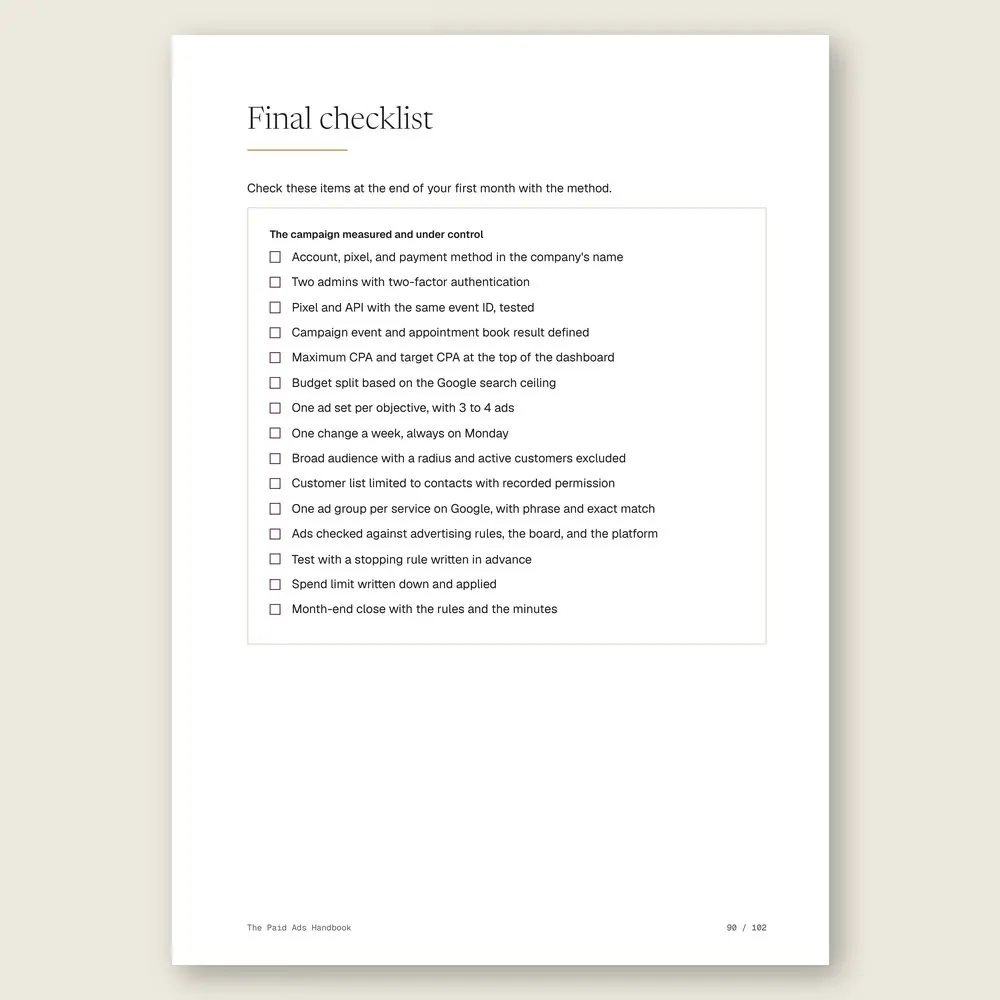
Five parts, in the order you'll need them. First, before you spend anything: the account, the pixel, the event worth measuring, and your maximum cost per booking. Then one lean campaign and a hands-off first week. Then audiences, keywords, and ads that stay within the rules. Then the numbers, from CPM to CPA. Finally, the rules to pause, scale, or hold.
WHAT YOU GET
Everything included in your purchase
- The Paid Ads Handbook in PDF: 24 tools, each with a step by step, a worked example, and a short exercise
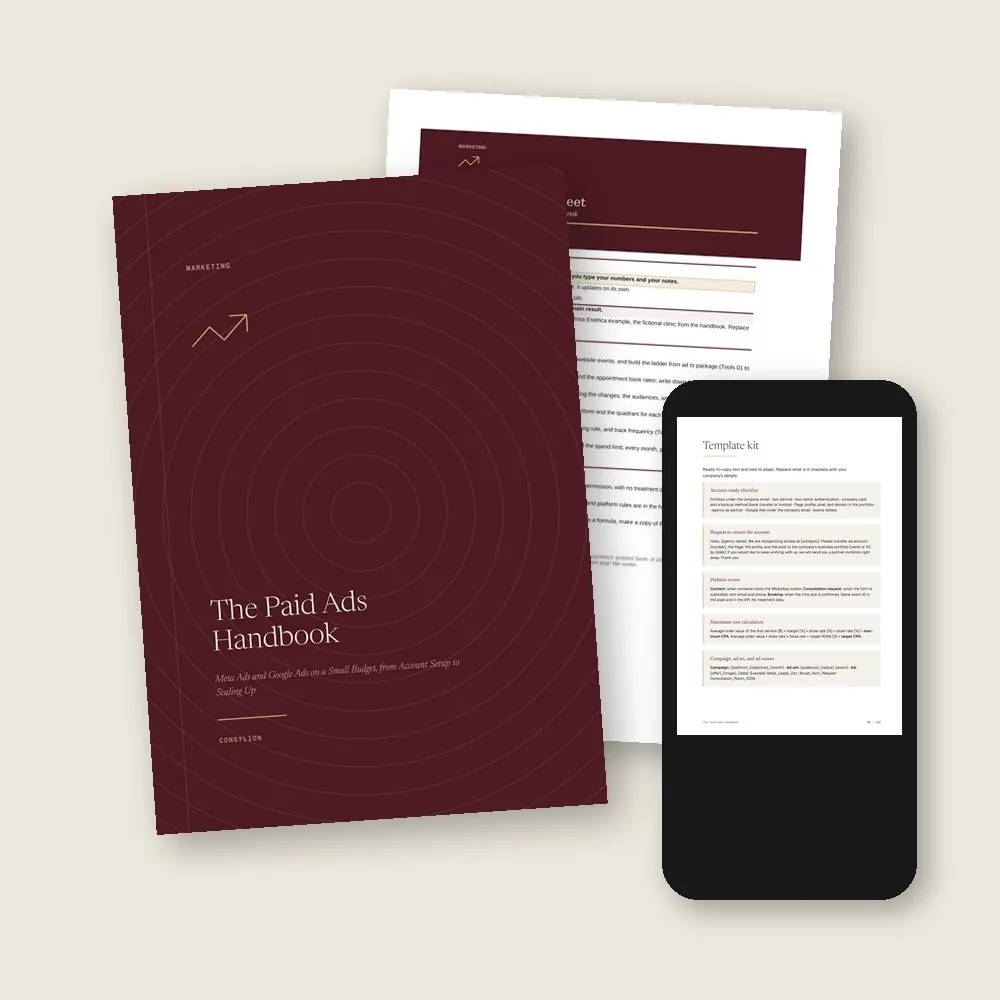
- The Paid ads spreadsheet in Excel and Google Sheets, with 6 working tabs, filled in with the example clinic
- The Template kit: 14 ready-made texts, from the account-ready checklist and starter negative keywords to the Monday dashboard and the pause and scale rules
- 2 worksheets to fill in (new campaign and month-end close) and a 30-day plan, one week per stage
- Access to your handbook on the Consylion platform
Full table of contents
The 24 tools, in the order you'll use them
Part 1 · Part 1 · Before the first paid click
- 01Your account in orderBusiness portfolio and Google account in the company's name, with two admins, so nobody walks off with your history
- 02Pixel and Conversions APIYour website telling the platform who requested a consultation and who booked
- 03The conversion worth measuringThe one event the campaign optimizes for, and what your appointment book confirms
- 04The maximum cost per bookingHow much you can pay for a booked consultation, worked out from average order value and margin
Part 2 · Part 2 · Building the campaign
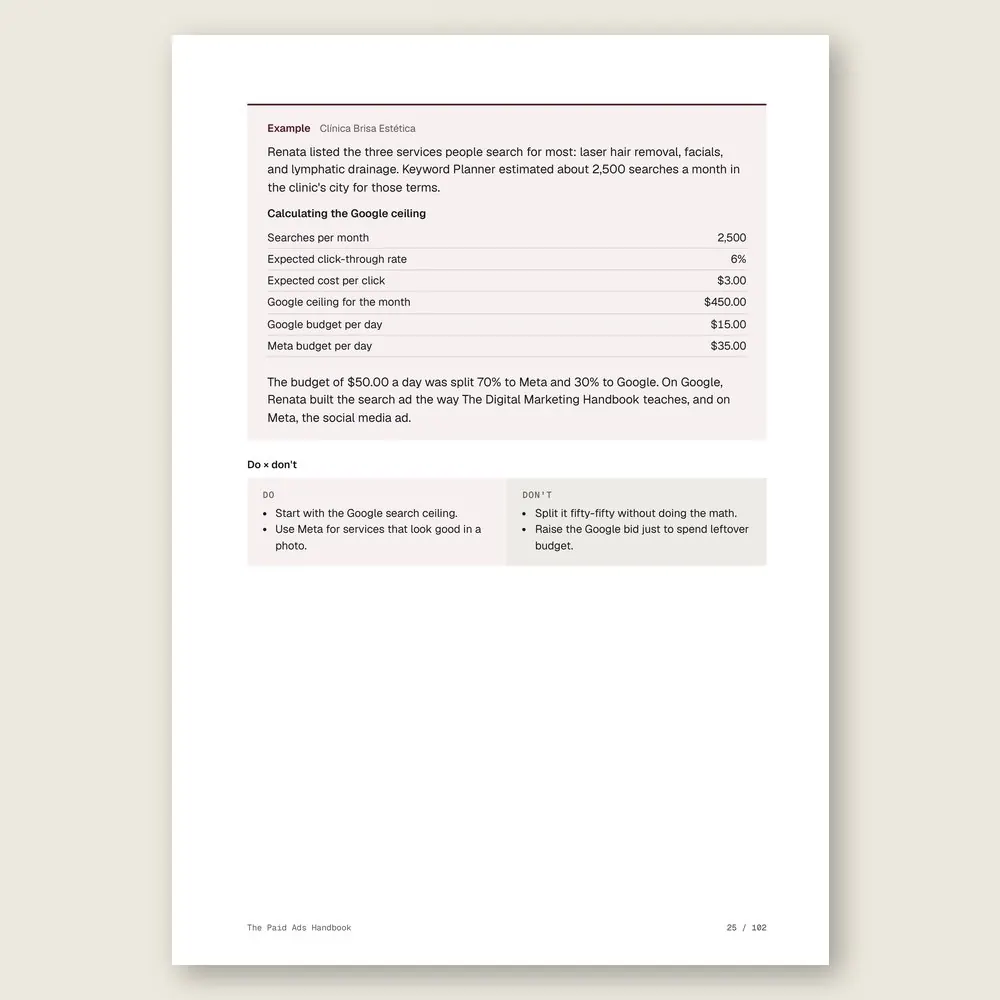
- 05Meta or Google: where to spend firstWho is already searching, who isn't yet, and how to split the first month
- 06The lean structureOne campaign, one ad set, a few ads, so a small budget has room to learn
- 07The daily budgetHow much to set per day and how much extra the platform is allowed to spend
- 08A hands-off first weekThe learning phase, and the changes that send your campaign back to square one
Part 3 · Part 3 · Audiences and ads
- 09Broad audience with a radiusSet the area and age, then let the ad find who responds
- 10Custom and lookalike audiencesCustomers, visitors, and followers, to target and to exclude
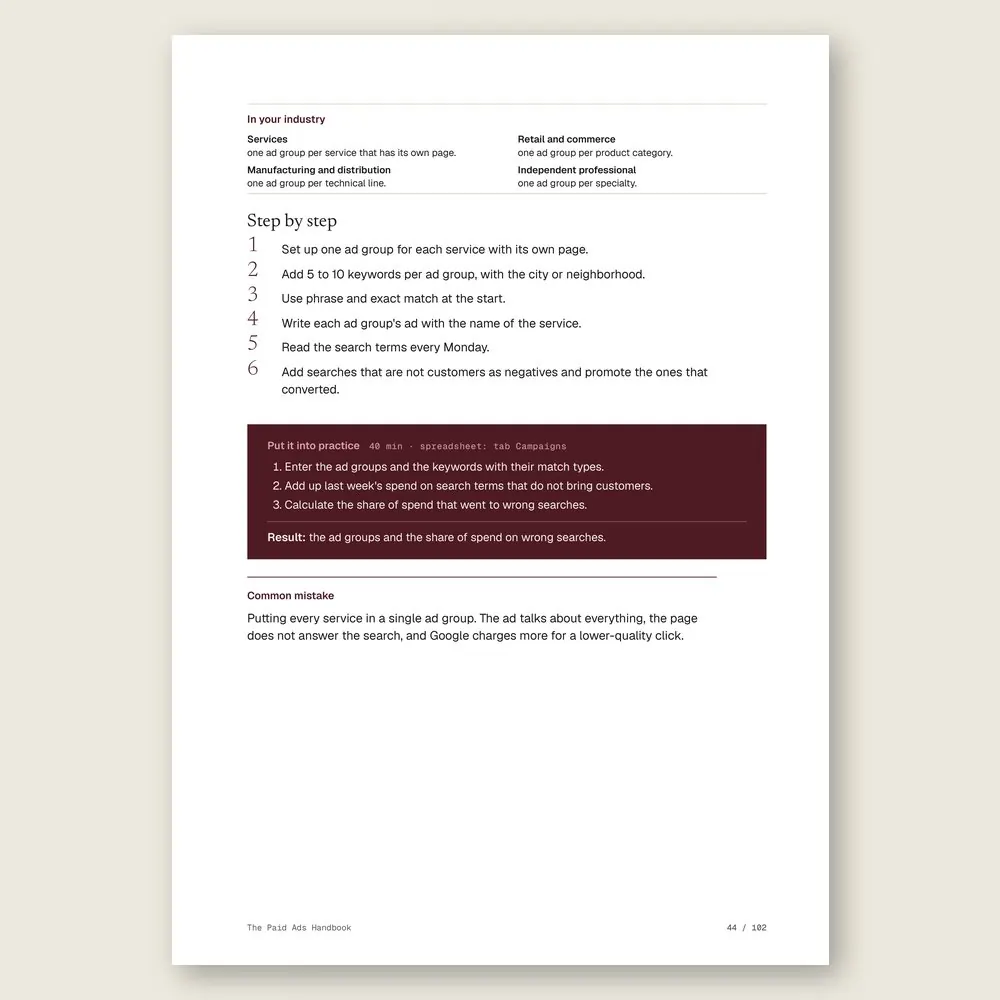
- 11Google ad groups and match typesOne ad group per service and keywords in the right match type
- 12Bidding on GoogleFrom paying for clicks to paying for conversions, as fast as your data allows
- 13Aesthetics ads within the rulesBefore-and-after photos, promises, and health claims, checked against licensing board and platform rules
Part 4 · Part 4 · Reading the numbers
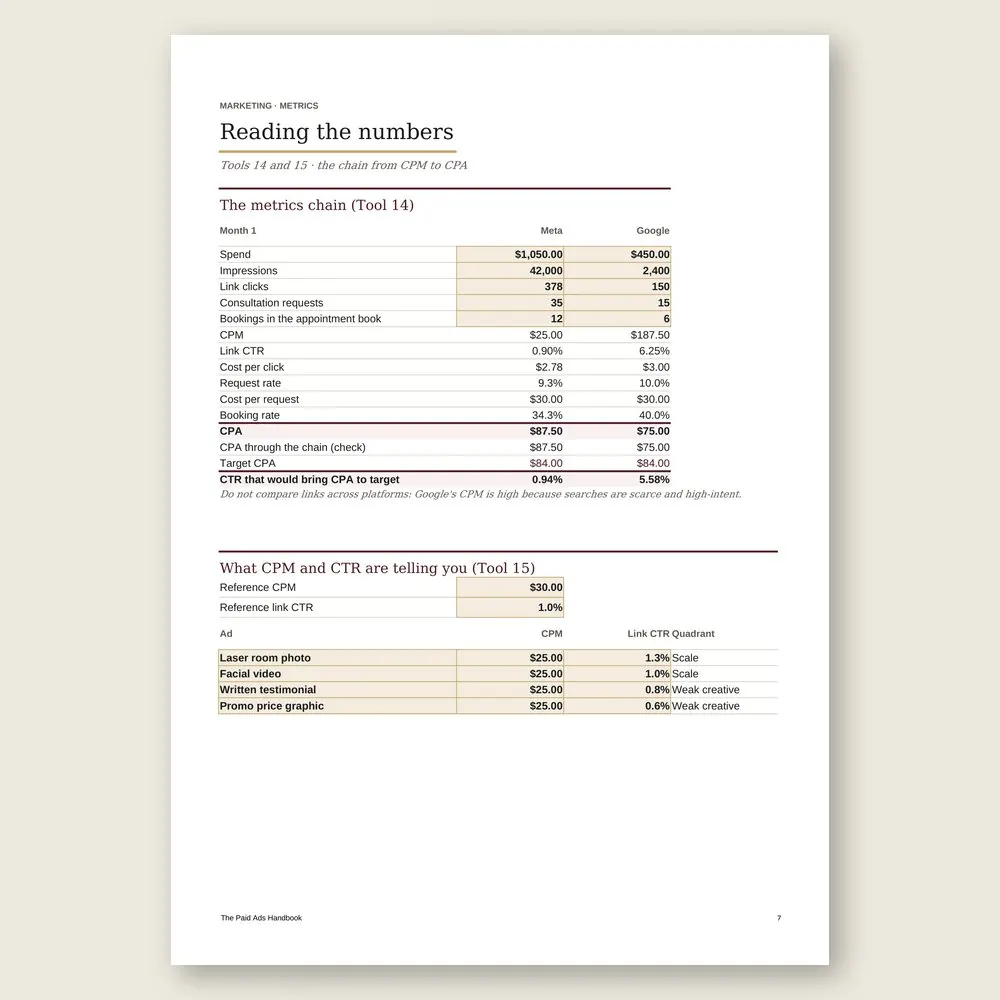
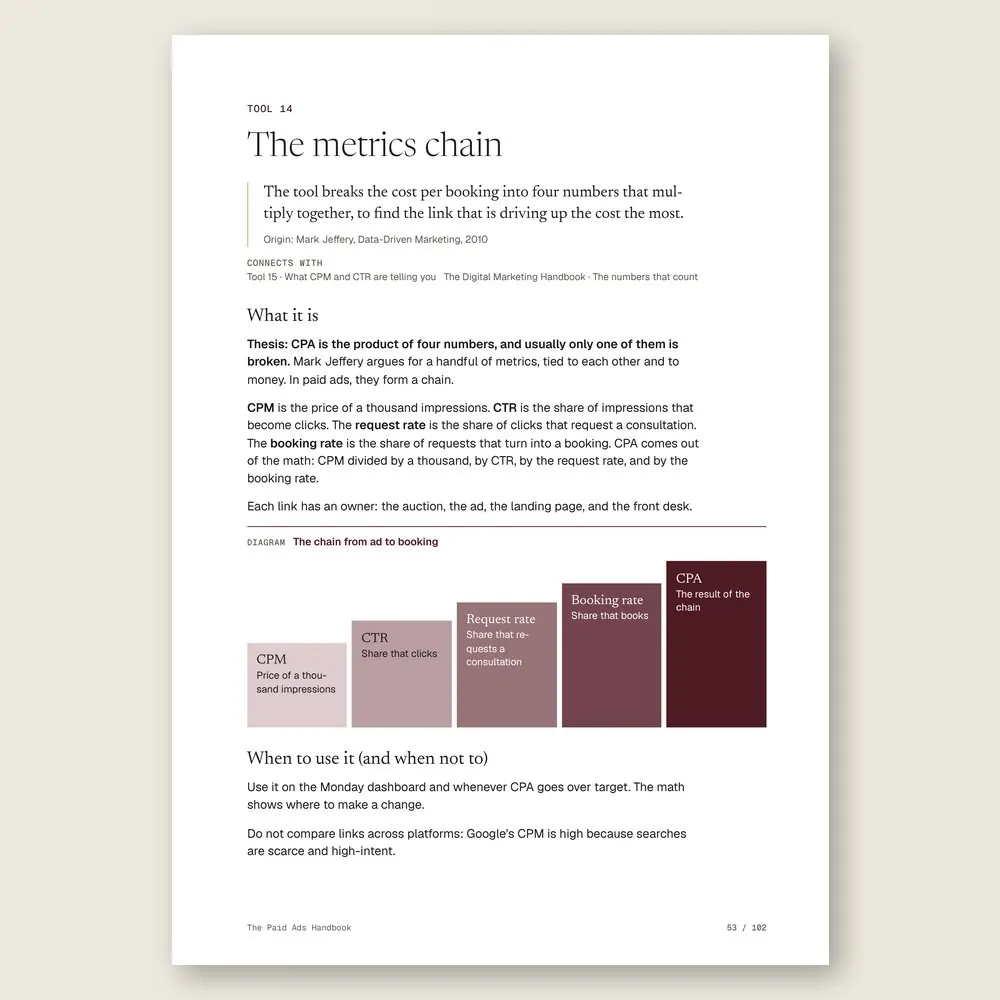
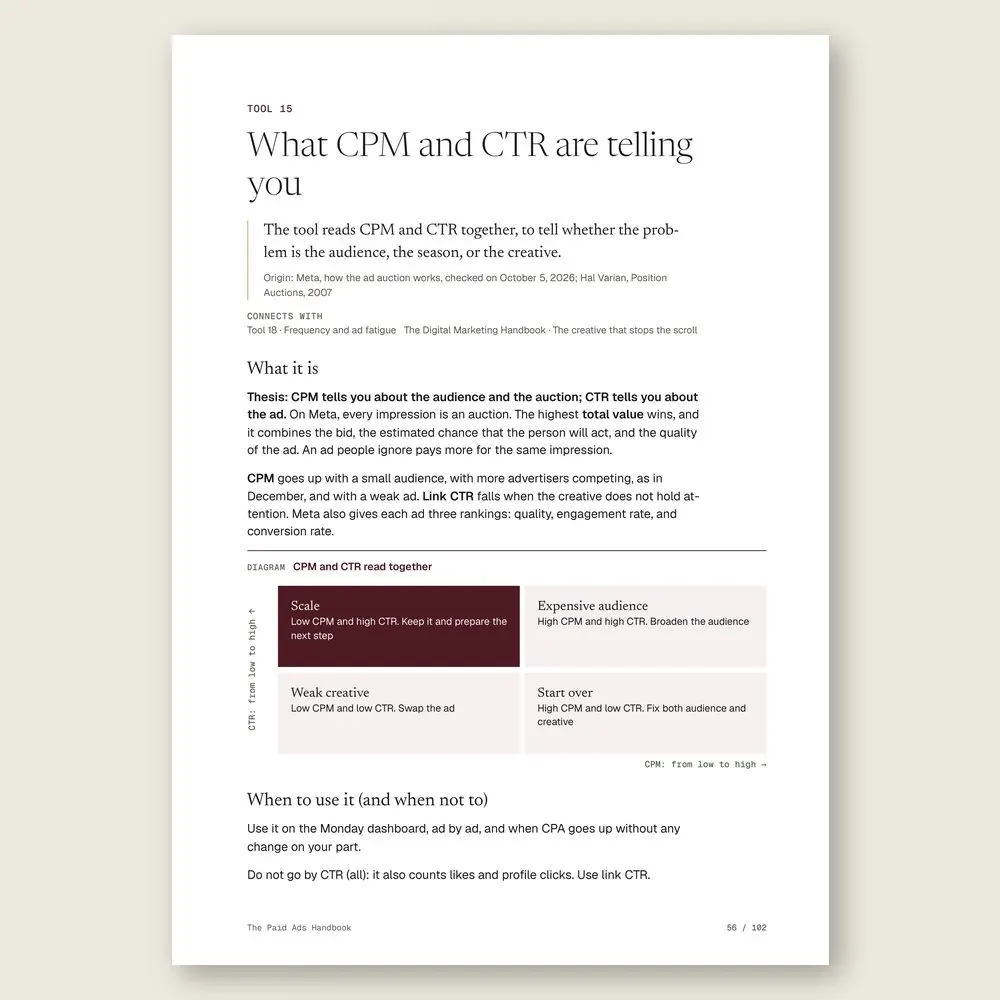
- 14The metrics chainCPM, CTR, conversion, and CPA in one calculation, to find the weak link
- 15What CPM and CTR are telling youWhat the price of an impression and the click-through rate say about your audience and your ad
- 16The ROAS that pays the billsThe minimum return your margin requires, and what the business actually keeps
- 17When a test has a winnerHow many results to wait for before you pick the ad that stays
- 18Frequency and ad fatigueThe sign your audience has seen the ad too often, and when to swap the creative
Part 5 · Part 5 · Pause, scale, or hold
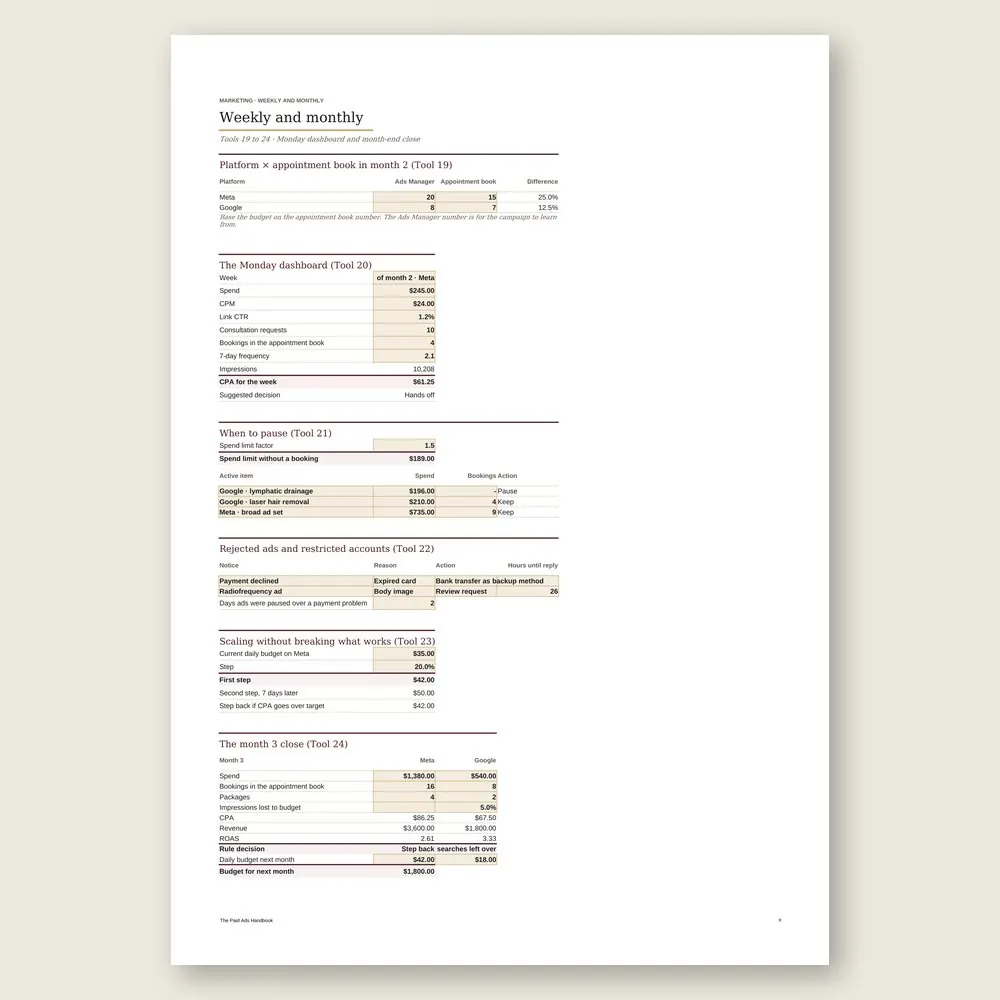
- 19Platform × appointment bookWhat Ads Manager counts versus what your front desk actually confirms
- 20The Monday dashboardFifteen minutes a week with the same six numbers for each campaign
- 21When to pauseA spend limit set in advance, so "I've already spent so much" stops making the call
- 22Rejected ads and restricted accountsWhat to do when the platform blocks your ad or your account
- 23Scaling without breaking what worksSmall budget steps, one at a time, and the search ceiling to watch on Google
- 24The month-end closeThe rule that sets next month's budget: up, hold, or down
Who it's for
It's for you if
- You want to run your own ads on Instagram, Facebook, and Google on a small budget
- You've boosted posts or paid an agency and still can't say how much came back
- You sell by appointment, over the counter, or over WhatsApp and need to tie each ad to the customers it brought in
- You want a written rule for when to pause and when to add budget, so the decision isn't based on a bad Tuesday
- You're willing to finish setup and tracking before you spend anything
It's not for you if
- You want a map of every digital channel for your business. That's The Digital Marketing Handbook
- You want to learn to write the ad copy and the sales page. See The Copywriting Handbook
- You need to set the year's marketing budget and channels. Start with The Marketing Handbook
- You want someone to promise you customers or a return on ad spend. This handbook organizes the work and measures whether it pays for itself
Frequently asked questions
I don't run a clinic. Will this work for my business?
If you sell to customers you can count, yes. The example is an aesthetics clinic, but every tool shows how it applies to services, retail, manufacturing and distribution, and independent professionals. A store counts orders, a factory counts quote requests, and the logic stays the same.
How big a budget do I need to start?
Whatever you could lose for a month without panicking. The handbook explains why a budget that's too thin barely lets the campaign learn, and one calculation shows how much Google can absorb before the rest goes to Meta.
Isn't boosting a post the same thing?
No. The boost button creates a simple campaign with little control and no choice of what to optimize for. The handbook works in Ads Manager and Google Ads, with the event you chose in Part 1.
Should I hire an agency or do it myself?
The handbook suggests doing it yourself for the first three months so you learn to read the numbers. If you hire someone later, the account stays in the company's name and the agency comes in as a partner.
Will this make my ads profitable?
No handbook can promise that. What it gives you is a maximum cost per booking set before you spend, a weekly reading of the same numbers, and written rules for when to pause, scale, or hold. The first month is for measuring.
How much time does this take?
About 2 hours and 24 minutes of reading, or 6 minutes per tool, plus the exercises. Part 1 asks for one afternoon with the company login and website access. After that, it's fifteen minutes every Monday and a month-end close on the first business day.
What do I get, and in what formats?
Each handbook is a PDF of about 100 pages with 24 to 27 tools. Every tool has step-by-step instructions and a worked example. You also get the handbook's spreadsheet in Excel (.xlsx), which opens in Google Sheets too, with the example already filled in. The message, policy, and clause templates are in the Template Kit inside the PDF, ready to copy and adapt. Read it in the member area or download the files.
How do I know if it fits my business?
Each handbook's page shows the problem it solves, who it is for and who it is not for, the full table of contents, sample pages, and the company used in the examples. The examples come from small businesses in several industries, with illustrative numbers. If it is not a fit, you can ask for a full refund within 14 days of your purchase, as described in the Refund Policy.
What is the difference between a handbook, an area set, and the Series?
A handbook solves one problem. An area set brings together every handbook and spreadsheet in one of the 6 areas, for less than the price of 5 single handbooks. The Consylion Handbook Series brings together all 100 handbooks and 100 spreadsheets, for less than the price of 8 single handbooks, and includes the next handbooks in the Series. Products outside the Series, from Consylion Life or Consylion Business, have their own price. They are sold separately and are not part of an area set or the Series.
Do I need to read everything before I start?
No. Each tool works on its own. Open the table of contents, pick the tool for today's problem, and start there. You can also read it cover to cover.
Do I need to know Excel?
The basics are enough: open the file and fill in the marked fields. The formulas are already built, and the handbook's example is filled in for reference.
How do I pay, and when do I get access?
By card or bank transfer, as a one-time payment with no subscription. Once your payment is confirmed, you get access to the member area by email. Approved card payments are confirmed right away. Bank transfers are confirmed when the funds clear. If access does not arrive within 24 hours of confirmation, check your spam folder and write to team@consylion.org.
How long do I have access, and how can I use the files?
Access does not expire, and you can download the files for offline use. The license is individual. You may read the handbooks, print them for your own use, and fill in and adapt the spreadsheet and templates with your company's data. If you are a consultant, accountant, or manager, you may apply the tools with your clients and deliver the result of your work, not the files. You may not share, resell, or distribute the files or the access.
How do support and refunds work?
Support is by email at team@consylion.org, on business days, with a reply within 5 business days. It covers questions about access, files, and payment. It does not include consulting or advice on applying the material to your case. You can cancel within 14 days of your purchase, without giving a reason, and get the full amount back through the payment method you used. Send the request to the same email. The details are in the Refund Policy.
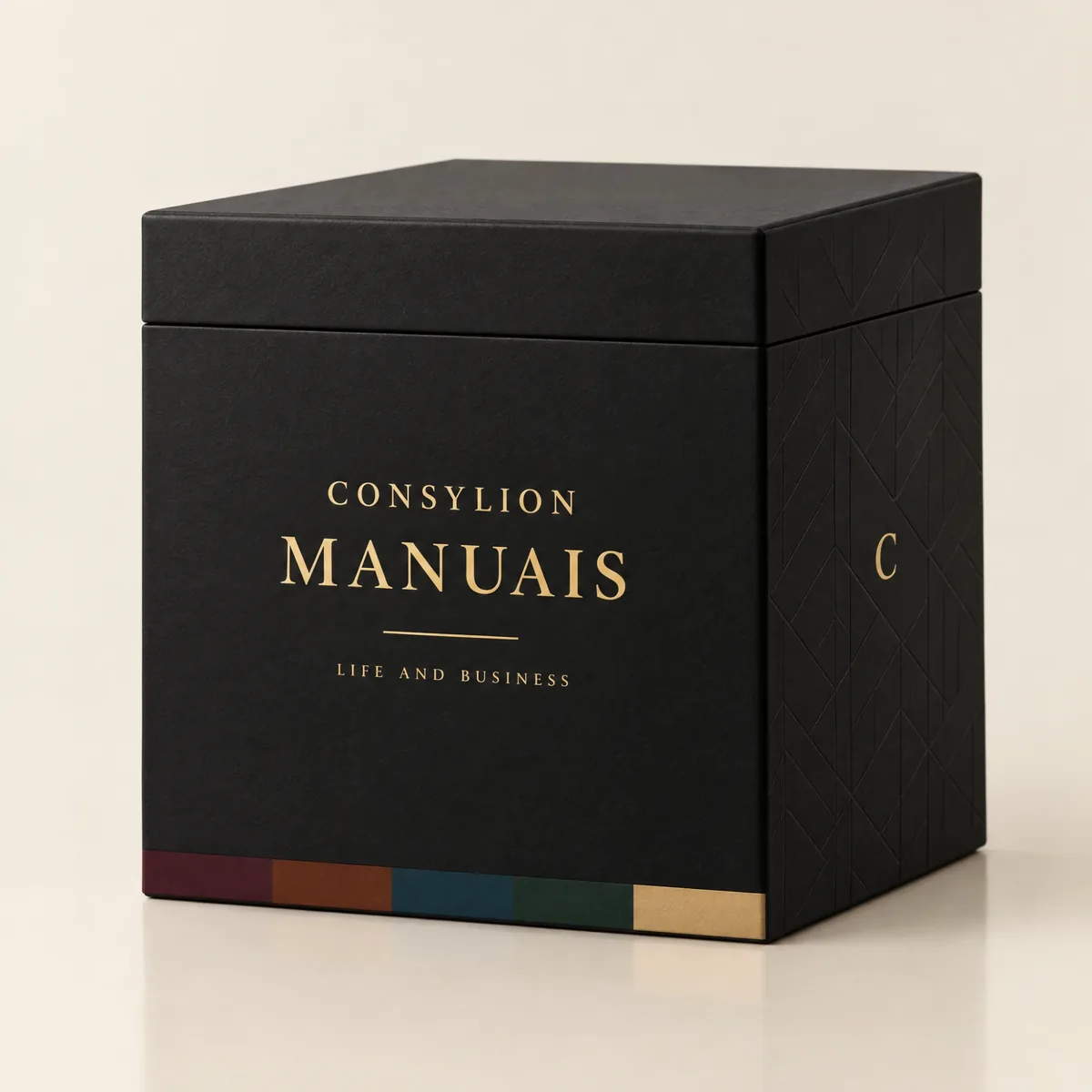
CONSYLION HANDBOOK SERIES
The 6 departments of your business, for less than the price of 8 single handbooks.
This handbook solves today's problem. The Series solves the next one, and the one after that, with nothing more to pay.
- 100 handbooks with 2,403 ready-made tools, to read on screen and download as PDFs
- 100 spreadsheets for Excel and Google Sheets
- 6 business areas
- Lifetime access, unlocked once payment is confirmed
One-time payment of $197.00. The order form shows the final amount, with any taxes for your country, before you pay.
Digital delivery: PDF handbook, spreadsheet and access on the Consylion platform.
14-day money-back guarantee: if it isn't what you expected, request a full refund within 14 days of purchase.
Your order is processed by Digistore24, our authorized reseller. By purchasing, you accept the terms of use and purchase · refund policy.
Marketing · Nº 45
Spend money you can actually account for
Paid ads on a small budget aren't a gamble when you know what a booking is worth, what came back last week, and when to stop. This handbook gives you the setup, the spreadsheet, and the rules, written down before you spend. Whether the numbers justify more budget is something you'll see for yourself.
See all 100 handbooks · $197.00
One-time payment of $29.00. The order form shows the final amount, with any taxes for your country, before you pay.
Digital delivery: PDF handbook, spreadsheet and access on the Consylion platform.
14-day money-back guarantee: if it isn't what you expected, request a full refund within 14 days of purchase.
Your order is processed by Digistore24, our authorized reseller. By purchasing, you accept the terms of use and purchase · refund policy.