The Small Business Cybersecurity Handbook
Operations and Product · Nº 90
The Small Business Cybersecurity Handbook
Passwords, Backups, Scams, and Customer Data: The Basic Protection Every Small Business Needs
Your business runs on logins. Do you know who has every password?
24 tools and a spreadsheet to list your accounts, lock down passwords, stop payment scams, and test your backups. One flower shop with no IT team works through every step.
You get 24 tools to list every account and device, secure them with a password manager and two-step verification, stop payment scams, test your backups, and handle the first hour of an incident. Plus an 8-tab spreadsheet, filled in with the example.
A book explains the method. This handbook puts it to work: the tool, a worked example, and a spreadsheet with your numbers.
One-time payment of $29.00. The order form shows the final amount, with any taxes for your country, before you pay.
Digital delivery: PDF handbook, spreadsheet and access on the Consylion platform.
14-day money-back guarantee: if it isn't what you expected, request a full refund within 14 days of purchase.
Your order is processed by Digistore24, our authorized reseller. By purchasing, you accept the terms of use and purchase · refund policy.
Email, two bank accounts, the online store, the social media profile, the messaging number customers write to, the cloud with every photo and spreadsheet. Nobody knows how many accounts there are or whose name they're in. Most share one base password with the year on the end. A former employee can still log in. The backup has never been restored. And it only comes up when it's too late: an invoice with new bank details, a hijacked profile in your busiest week, a screen demanding a ransom.
THE SPREADSHEET
Cybersecurity spreadsheet
Use the completed example as a reference and enter your business data in the marked fields. Check the instructions and the calculations before you make a decision.
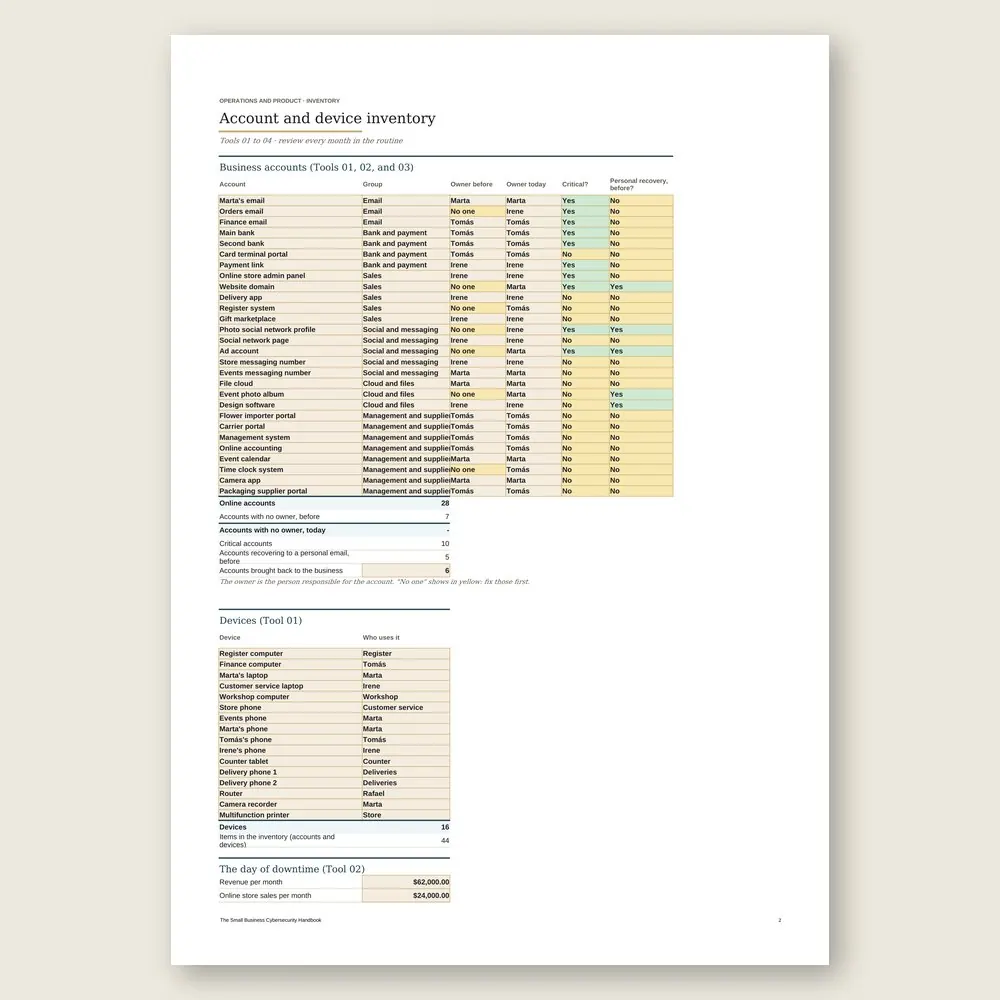
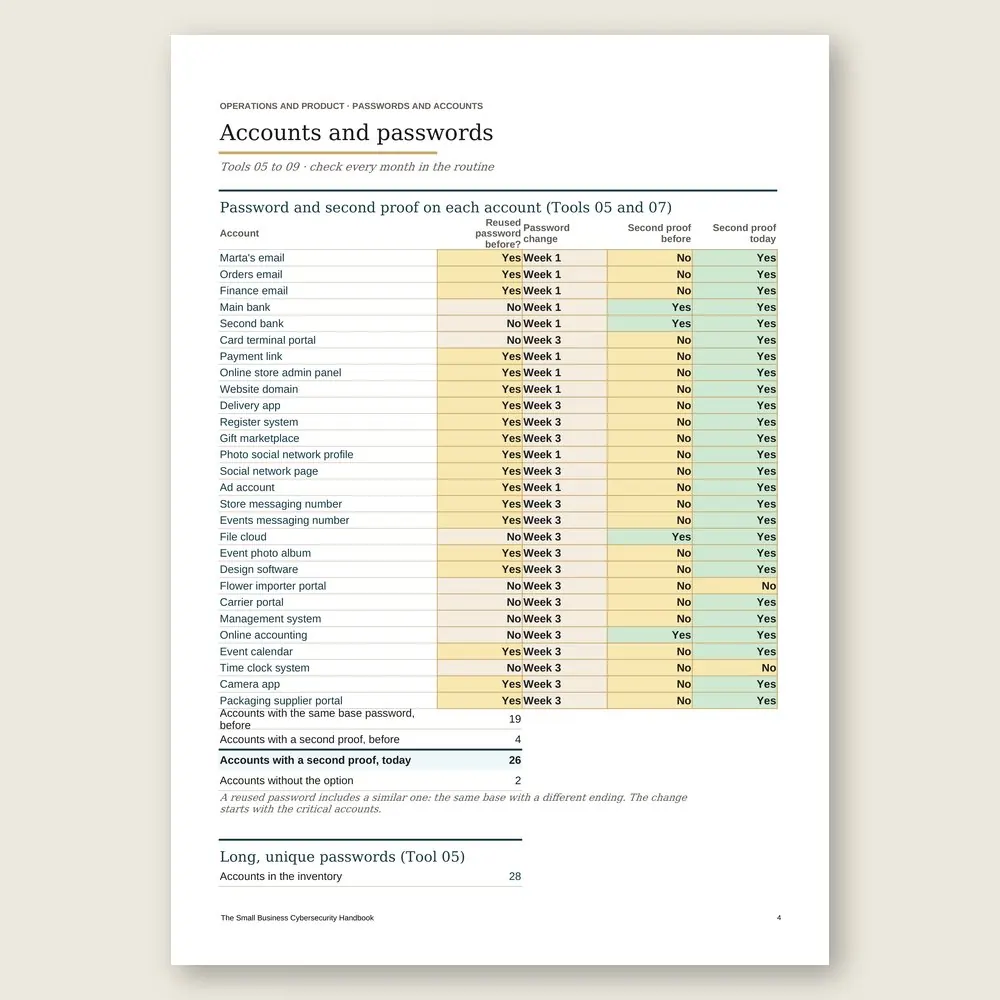
SOUND FAMILIAR?
Three situations this handbook solves
An email says your supplier changed banks
The invoice looks right and so does the amount. Before anyone pays, you call the number already on file, not the one in the email, and a second person approves the change. The call takes a few minutes, and no new account gets paid on an email's word.
Someone leaves the team
On their last day, before the workday ends, you run the last-day checklist: accounts locked, vault access removed, admin rights pulled, the passwords they knew changed, devices collected and wiped. Nothing waits until next month.
The first Tuesday of the month
One hour, ten checks: new accounts, email rules, social media admins, people joining and leaving, updates, connected devices, a restore test of one file, the month's scam attempts, payments above the limit, and the next training topic. Then you update the year's dashboard.
INSIDE
What you'll find in each tool
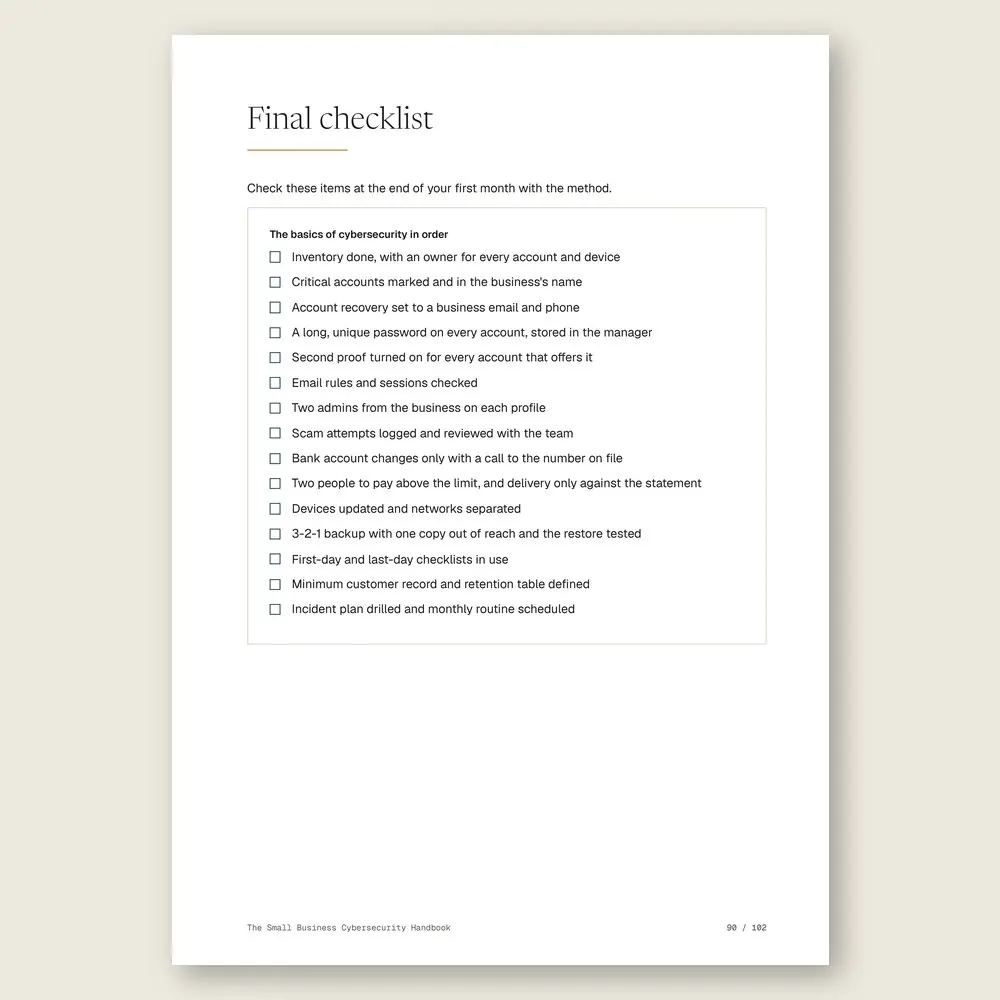
Five parts, in the order the work gets done. What to protect: the inventory, the accounts you can't afford to lose, and a one-page risk map. Accounts and passwords, starting with email. Scams against the business, from the fake supplier to the fake receipt. Devices, network, and backups. Then customers, incidents, and a one-hour monthly routine that keeps it all current.
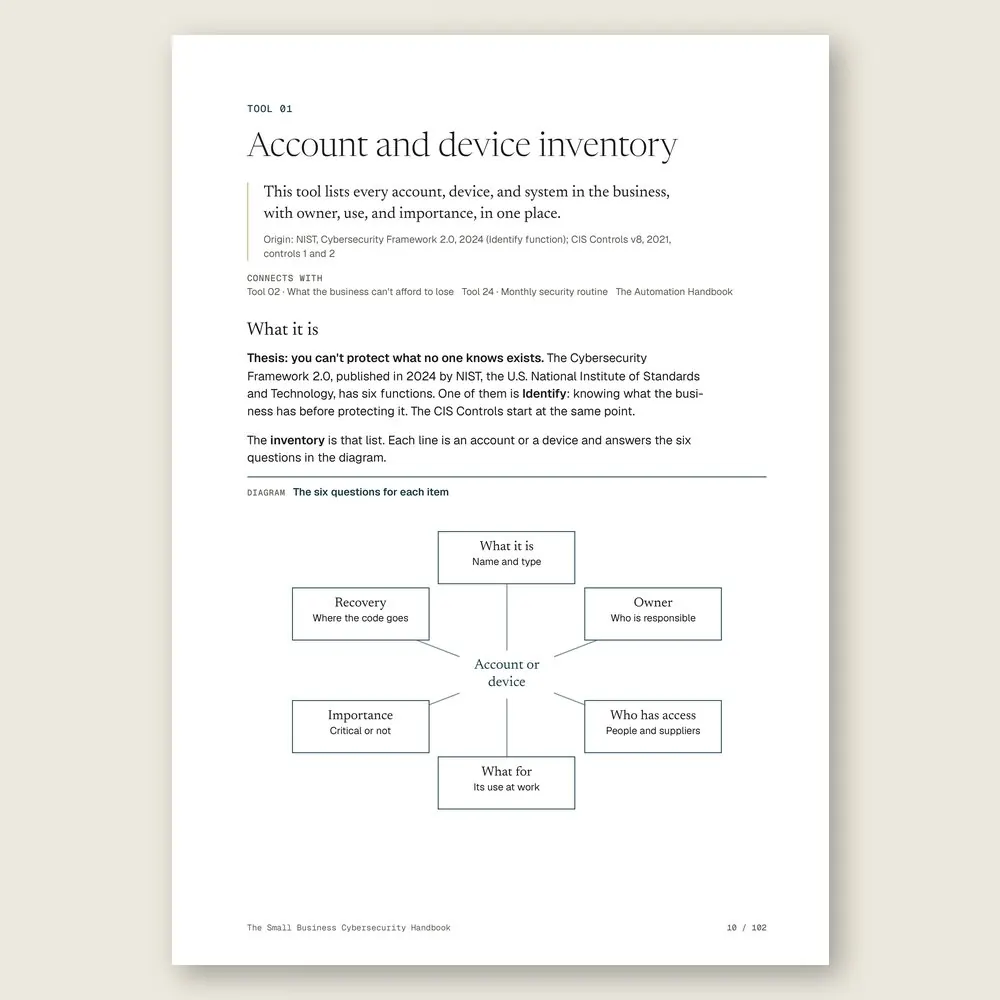
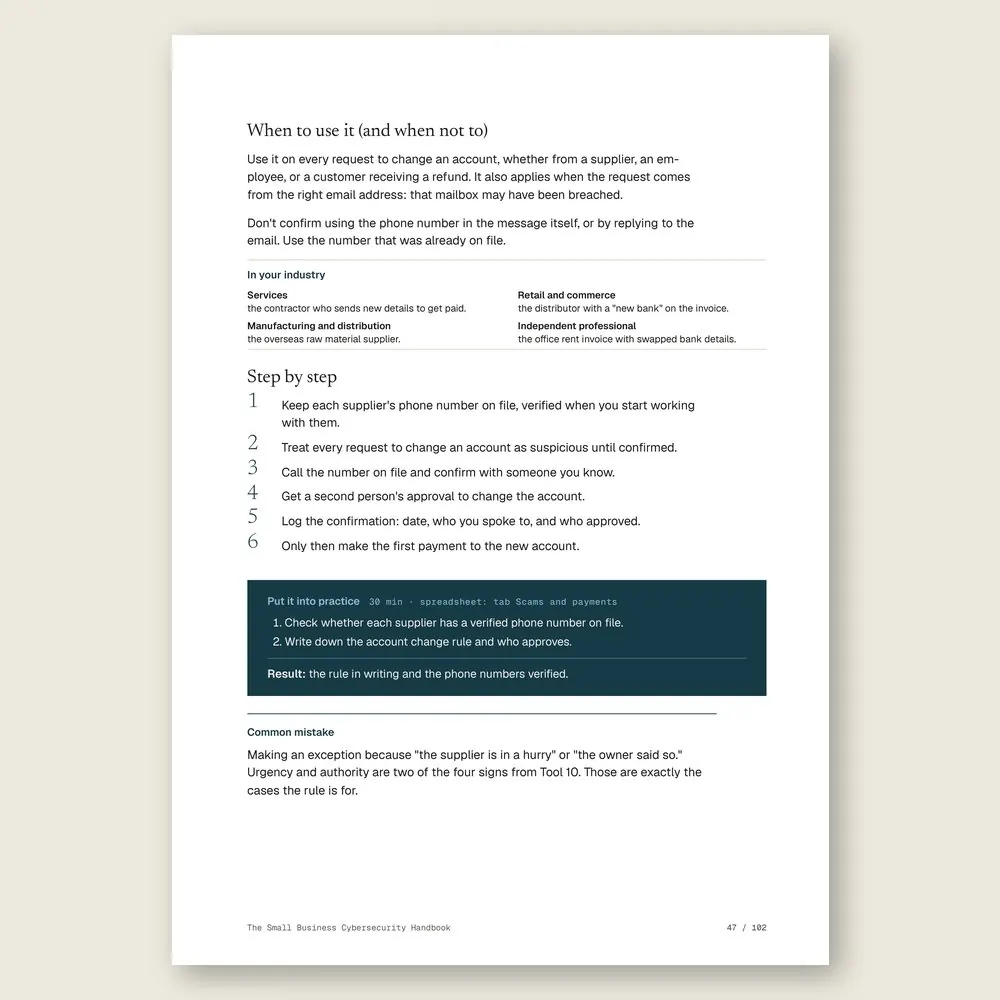
WHAT YOU GET
Everything included in your purchase
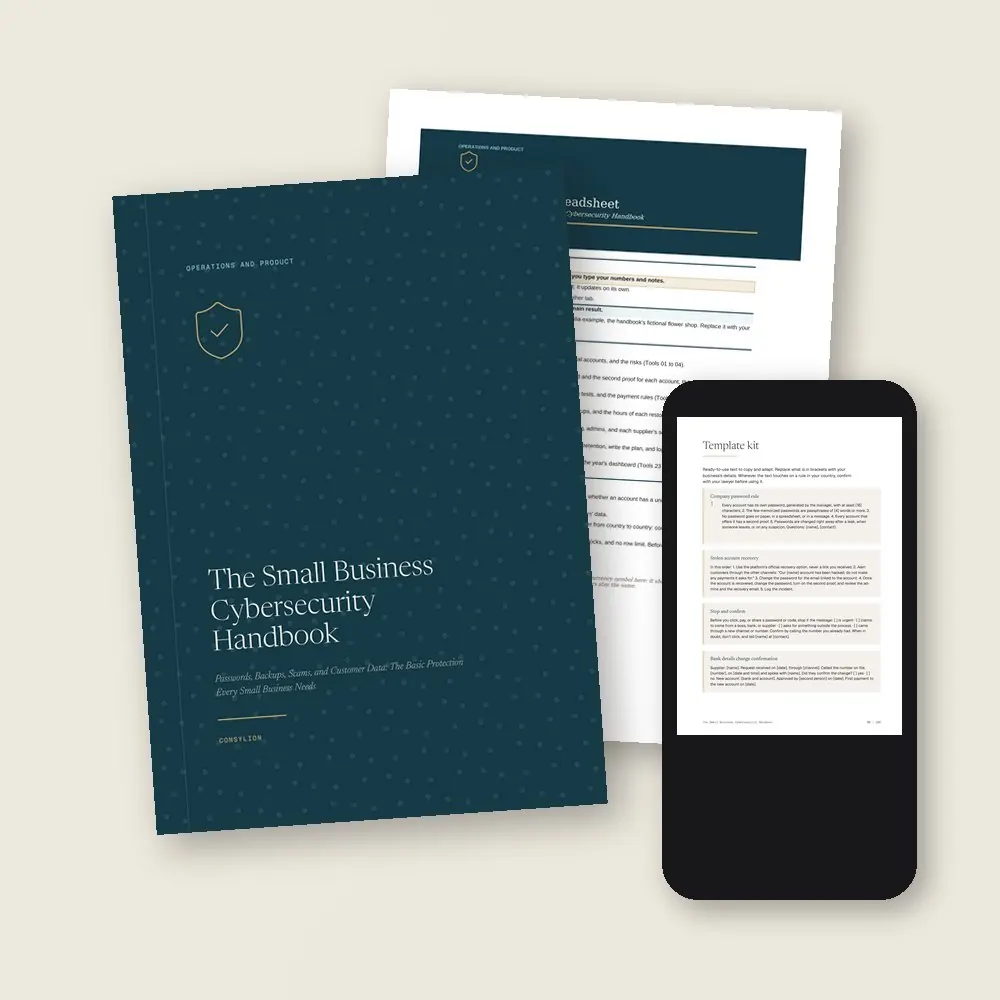
- The Small Business Cybersecurity Handbook in PDF: 24 tools, each with step-by-step instructions, a worked example, and an exercise
- The Cybersecurity spreadsheet in Excel and Google Sheets, with 8 tabs (How to use plus 7 working tabs), filled in with the example company
- The Template kit: 14 ready-made texts, including Stop and confirm, the bank details change confirmation, the first-day and last-day checklists, and the first hour of an incident
- 2 worksheets to fill in (critical account and incident log) and a 30-day plan, one week per stage
- Access to your handbook on the Consylion platform
Full table of contents
The 24 tools, in the order you'll use them
Part 1 · Part 1 · What to protect
- 01Account and device inventoryEvery account, device, and system the business uses, on one list, each with an owner
- 02What the business can't afford to loseWhat a leak, tampering, or an outage would cost, so you protect what hurts most first
- 03Accounts in the business's nameDomain, email, bank, and social media registered to the business, with recovery that works
- 04One-page risk mapThe most likely risks and the response to each, on a single page
Part 2 · Part 2 · Accounts and passwords
- 05Long, unique passwordsA password rule your team can follow without notes stuck to the monitor
- 06Password managerPasswords stored and shared by role, in vaults, never in a spreadsheet or a message
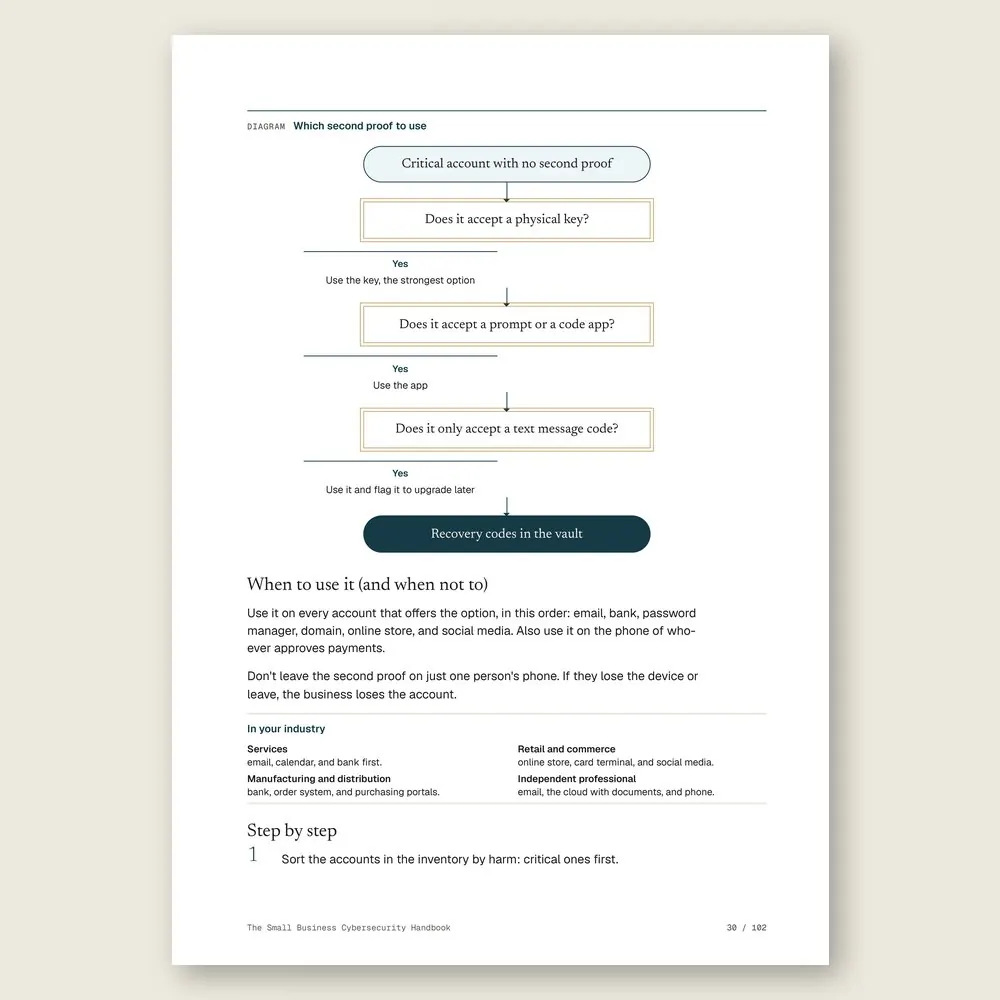
- 07Two-step verificationA second proof on email, bank, and social media, in order of priority
- 08The business emailThe account that can reset every other one, with recovery and forwarding rules checked
- 09Social media and messaging appsProfile and number locked against takeover, and a plan if you lose the account
Part 3 · Part 3 · Scams against the business
- 10How scams win people overThe four signs found in almost every scam, and a log of every attempt
- 11Phishing and links that ask for a passwordHow to spot a fake message, and a test run with your team
- 12Fake suppliers and changed bank detailsThe confirmation call that stops an invoice with new bank details
- 13Safe payments and fake receiptsTwo people approve payments above a limit, and nothing ships until the money shows on the statement
Part 4 · Part 4 · Devices, network, and backups
- 14Device updatesComputers, phones, and the router up to date, and what to do with unsupported devices
- 15Wi-Fi and the business networkSeparate networks for the team, customers, and devices, and a guest password that changes every month
- 16The 3-2-1 backupThree copies, two kinds of location, one out of reach, and a restore test to prove it comes back
- 17Access when people join and leaveThe first-day and last-day checklists for each person
- 18Suppliers and the cloudEight questions before you grant access, and a score for each supplier
Part 5 · Part 5 · Customers, incidents, and routine
- 19Customer data: only what you needThe fields that come off the customer record, and the reason for each one that stays
- 20Retention and disposalHow long to keep each type of data, and how to truly delete it
- 21Incident response planWho does what in the first hour, and how the business gets back to work
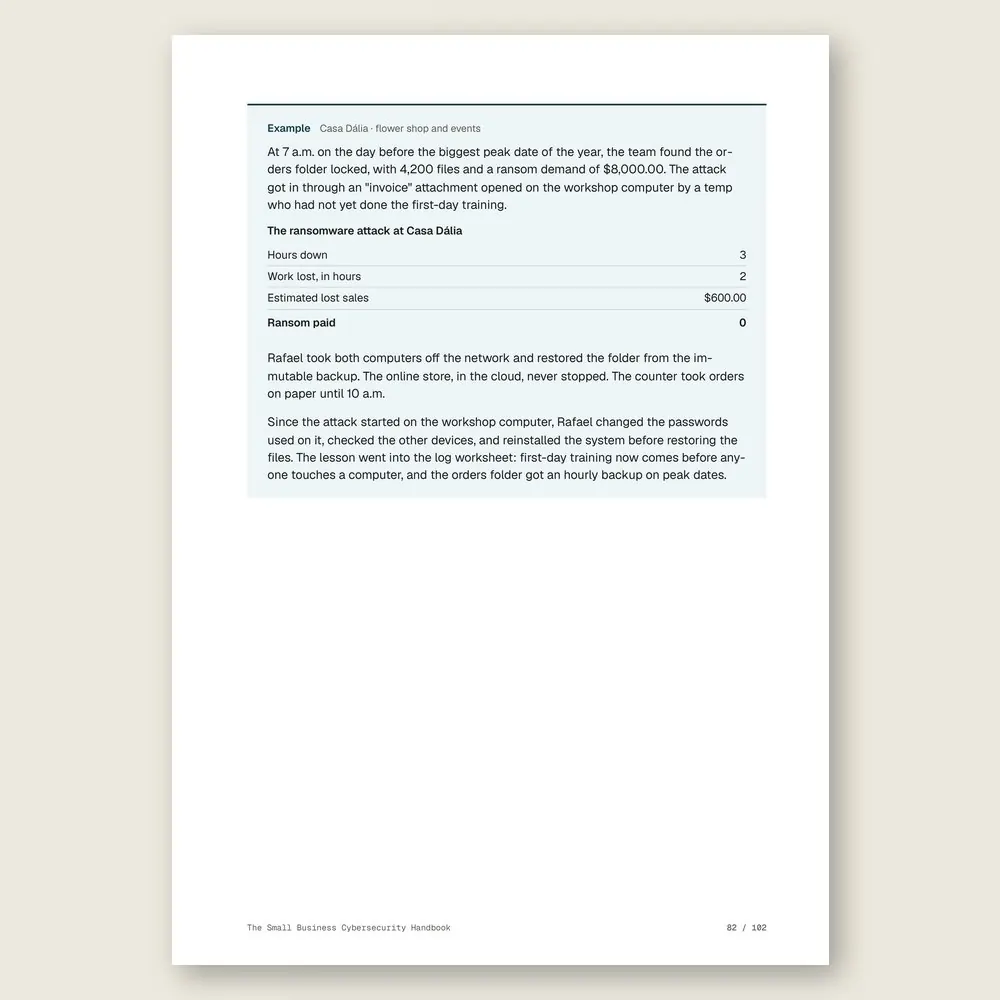
- 22RansomwareIsolate, assess, restore from the backup, and don't negotiate blind
- 2315-minute trainingOne topic a month, so the team remembers when it counts
- 24Monthly security routineOne hour a month and a dashboard that keep everything up to date
Who it's for
It's for you if
- You use the same password on several accounts and aren't sure who else knows it
- You've already gotten an email or message trying to change where you send payments
- You've never tested whether your backup actually comes back
- Your business runs on email, online banking, an online store, social media, and messaging, with no IT team
- You want the basics of protection in place without hiring a security firm
It's not for you if
- You need detailed guidance on your country's data protection law. The handbook gives universal principles and leaves the law to your lawyer
- You want to build a large company's security department, with certifications
- You want to choose and connect your business systems. That's The Automation Handbook and The Digital Transformation Handbook
- You expect zero risk. This handbook puts the basics in order and shows what to take to a specialist
Frequently asked questions
My business is small. Would anyone really bother attacking it?
Most attacks are automated and don't pick victims by size. Bots test leaked passwords and send the same fake email to thousands of businesses at once, and small businesses usually leave more doors open. Tool 01 starts there.
Do I need to hire a security firm?
Not for the basics. The tools take your time plus a few hours from a trusted technician. The handbook tells you when to call in a specialist: a serious incident or a custom system.
Isn't antivirus enough?
No. It helps, but it doesn't stop a scam that persuades a person, a reused password, or a device without updates. Tools 05, 10, and 14 cover those.
What will it cost to get the basics in order?
Mostly time, not money. The usual expenses are a password manager, a cloud backup, and replacing a router or an unsupported computer. The example company bought a password manager, a cloud backup, a router, and a computer. No expensive system.
Does this cover the data protection rules in my country?
No. The handbook gives universal privacy principles and the basic protections, and doesn't interpret any law. Wherever the rules change from one country to another, an "In your country" box tells you what to confirm with your lawyer or accountant.
I'm not technical. Can I follow this?
Yes. It's a beginner-level handbook: about 2 hours and 24 minutes of reading, 6 minutes per tool, plus each exercise. For the parts that go better with a technician beside you, like devices, the network, and backups, the handbook says so.
What do I get, and in what formats?
Each handbook is a PDF of about 100 pages with 24 to 27 tools. Every tool has step-by-step instructions and a worked example. You also get the handbook's spreadsheet in Excel (.xlsx), which opens in Google Sheets too, with the example already filled in. The message, policy, and clause templates are in the Template Kit inside the PDF, ready to copy and adapt. Read it in the member area or download the files.
How do I know if it fits my business?
Each handbook's page shows the problem it solves, who it is for and who it is not for, the full table of contents, sample pages, and the company used in the examples. The examples come from small businesses in several industries, with illustrative numbers. If it is not a fit, you can ask for a full refund within 14 days of your purchase, as described in the Refund Policy.
What is the difference between a handbook, an area set, and the Series?
A handbook solves one problem. An area set brings together every handbook and spreadsheet in one of the 6 areas, for less than the price of 5 single handbooks. The Consylion Handbook Series brings together all 100 handbooks and 100 spreadsheets, for less than the price of 8 single handbooks, and includes the next handbooks in the Series. Products outside the Series, from Consylion Life or Consylion Business, have their own price. They are sold separately and are not part of an area set or the Series.
Do I need to read everything before I start?
No. Each tool works on its own. Open the table of contents, pick the tool for today's problem, and start there. You can also read it cover to cover.
Do I need to know Excel?
The basics are enough: open the file and fill in the marked fields. The formulas are already built, and the handbook's example is filled in for reference.
How do I pay, and when do I get access?
By card or bank transfer, as a one-time payment with no subscription. Once your payment is confirmed, you get access to the member area by email. Approved card payments are confirmed right away. Bank transfers are confirmed when the funds clear. If access does not arrive within 24 hours of confirmation, check your spam folder and write to team@consylion.org.
How long do I have access, and how can I use the files?
Access does not expire, and you can download the files for offline use. The license is individual. You may read the handbooks, print them for your own use, and fill in and adapt the spreadsheet and templates with your company's data. If you are a consultant, accountant, or manager, you may apply the tools with your clients and deliver the result of your work, not the files. You may not share, resell, or distribute the files or the access.
How do support and refunds work?
Support is by email at team@consylion.org, on business days, with a reply within 5 business days. It covers questions about access, files, and payment. It does not include consulting or advice on applying the material to your case. You can cancel within 14 days of your purchase, without giving a reason, and get the full amount back through the payment method you used. Send the request to the same email. The details are in the Refund Policy.

CONSYLION HANDBOOK SERIES
The 6 departments of your business, for less than the price of 8 single handbooks.
This handbook solves today's problem. The Series solves the next one, and the one after that, with nothing more to pay.
- 100 handbooks with 2,403 ready-made tools, to read on screen and download as PDFs
- 100 spreadsheets for Excel and Google Sheets
- 6 business areas
- Lifetime access, unlocked once payment is confirmed
One-time payment of $197.00. The order form shows the final amount, with any taxes for your country, before you pay.
Digital delivery: PDF handbook, spreadsheet and access on the Consylion platform.
14-day money-back guarantee: if it isn't what you expected, request a full refund within 14 days of purchase.
Your order is processed by Digistore24, our authorized reseller. By purchasing, you accept the terms of use and purchase · refund policy.
Operations and Product · Nº 90
Close the doors before someone tries them
Most attacks on a small business aren't sophisticated. They find a door no one closed. This handbook gives you the tools, the spreadsheet, and a worked example to list what you have, lock down the accounts that matter, and keep it all current in one hour a month.
See all 100 handbooks · $197.00
One-time payment of $29.00. The order form shows the final amount, with any taxes for your country, before you pay.
Digital delivery: PDF handbook, spreadsheet and access on the Consylion platform.
14-day money-back guarantee: if it isn't what you expected, request a full refund within 14 days of purchase.
Your order is processed by Digistore24, our authorized reseller. By purchasing, you accept the terms of use and purchase · refund policy.